🎥 Dahua Integration
Dahua Technology devices provide robust edge analytics (IVS) that can be seamlessly integrated into the GCXONE Video Activity buffer. This guide focuses on setting up least-privilege users, IVS rules, and the critical reporting flag needed for signal transmission.
📋 Prerequisites
- Dahua Camera/NVR: Accessible via its web interface.
- Admin Credentials: Initial access to the Dahua system for user creation.
- NTP Sync: Device time must match GCXONE (use
time1.nxgen.cloud).
🚦 Integration Workflow
🛠️ Configuration Steps
- 1
1. Dedicated Cloud User
- 2
Log in to the Dahua web interface and navigate to Home → Accounts.
- 3
- Create a user named "NXGEN-SRV".
- Grant Permissions: Manual Control, System, Camera, System Info, and Event.
- This account ensures GCXONE has enough access to pull video without requiring full system admin rights.
- 4
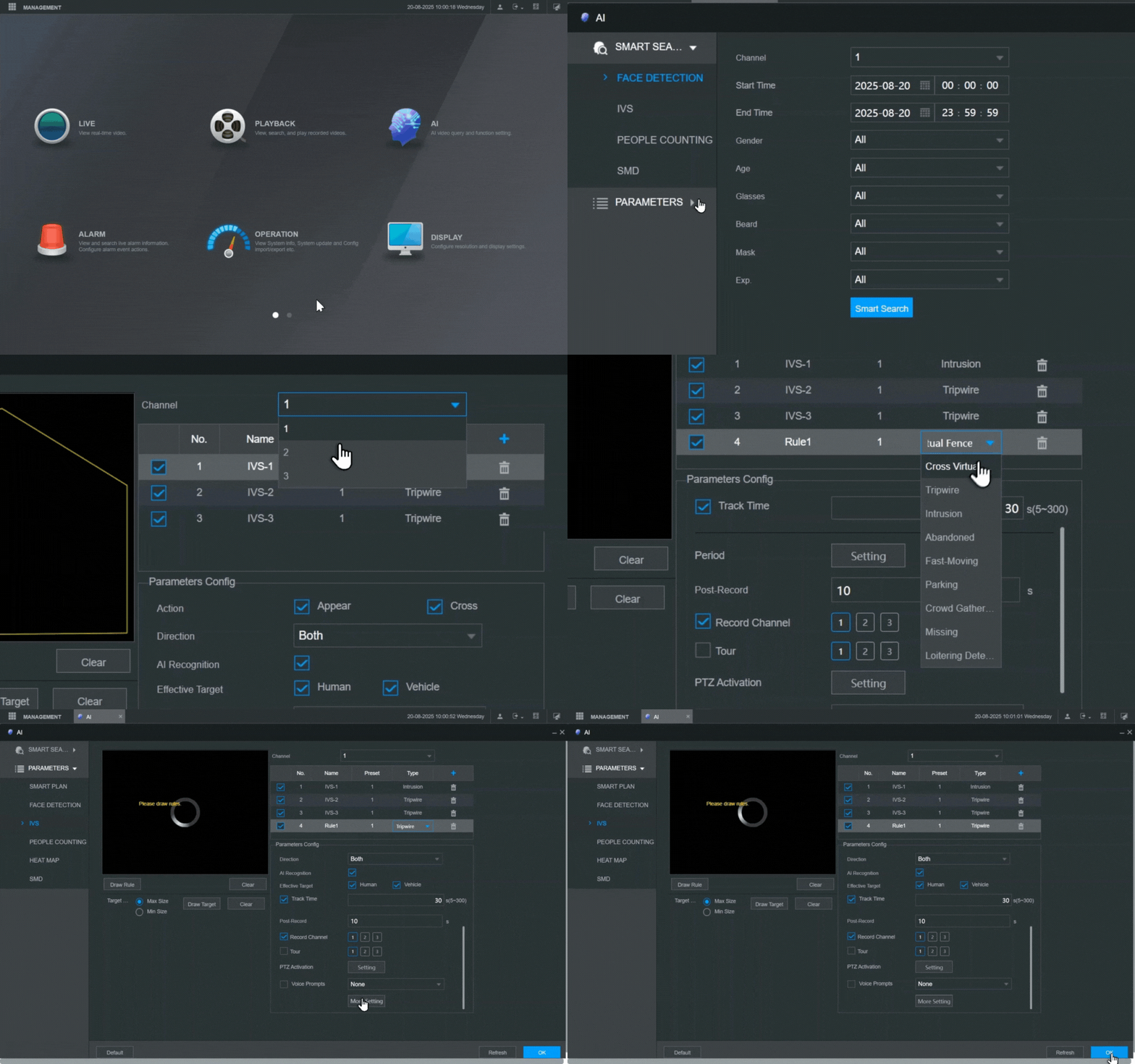
2. Configure IVS (Intelligent Video System)
- 5
Navigate to AI → Parameters → IVS.
- 6
- Select the target camera.
- Click + to add a rule (e.g., Tripwire or Intrusion).
- Draw your detection zone.
- Set the Target Filter to Human and Motor Vehicle to minimize false alarms from animals or debris.
- 7
- 8
3. Enable Alarm Reporting
- 9
CRITICAL STEP: By default, Dahua devices do not "push" their local alarms to external receivers.
- 10
- Navigate to More → Log → Report Alarm.
- Toggle this setting to Enabled.
- Click Save.
- 11
4. Final Discovery in GCXONE
- 12
- Log in to GCXONE → Sites → Devices.
- Click Add Device and select Dahua.
- Enter the Serial Number (P2P ID) and the NXGEN-SRV credentials.
- For NVRs: select the specific Channel you wish to register.
- Click Discover.
💡 Troubleshooting
- Live View Stutters: Decrease the substream bitrate in Dahua's Video settings. GCXONE defaults to the substream for efficient mobile and web viewing.
- No Events in Video Activity: Re-verify that Report Alarm is checked in the "Log" menu. Without this, no signals will reach our cloud.
- Incorrect Timestamps: Ensure the Dahua device is synced to an NTP server. Even a 60-second discrepancy can cause alarms to be "discarded" as stale data.