Site Synchronization
What Site Synchronization Does
GCXONE and Talos are designed to work as a unified system. Site Synchronization ensures that all site data created or updated in GCXONE is automatically reflected in Talos — keeping both platforms consistently aligned without manual intervention.
For a full overview of how GCXONE and Talos interact, refer to GCXONE & Talos Interaction.
Why It Matters
Sites that are out of sync between GCXONE and Talos cause alarm routing failures, missing site context, and operational gaps. Site Synchronization eliminates manual data entry and ensures both platforms always reflect the same ground truth.
How It Works
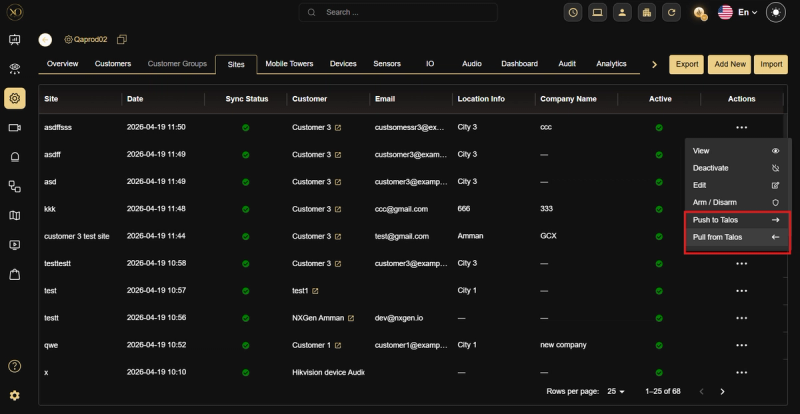
Step 1: Navigate to Configuration → Customers and select the relevant customer.
Step 2: Open the Sites tab and locate the site.
Step 3: Click the actions menu (···) next to the site.
Step 4: Select Push to Talos or Pull from Talos depending on the direction needed.
When to Use Manual Sync
Manual synchronization is needed when:
- A site was recently created but has not yet appeared in Talos.
- Site details were updated in one platform but not reflected in the other.
- Troubleshooting synchronization issues between the two platforms.
Key Capabilities
Automatic Synchronization (GCXONE → Talos) When a new site is created in GCXONE, it appears automatically in Talos. The following data is synchronized between the two platforms:
- Site name and address
- Contact information
- Geographic coordinates
- Configuration parameters
- Operational status
Synchronization happens in real time via MQTT messaging, with built-in error handling and retry logic to ensure reliability.
Reverse Sync (Talos → GCXONE) When a site is created in Talos before GCXONE, it is not automatically reflected in GCXONE and must be synchronized manually. For full steps, refer to GCXONE & Talos Interaction — Reverse Sync.
Manual Synchronization If a specific site is not fully synced, you can force synchronization manually from the site actions menu:
- Push to Talos — Sends the latest site data from GCXONE to Talos.
- Pull from Talos — Retrieves and updates site data from Talos into GCXONE.
Arm & Disarm From the same actions menu, you can arm or disarm a site directly without navigating to Talos. This is useful for quick operational control during incidents or maintenance windows.
Real-World Use Cases
- An admin creates a new site in GCXONE — it appears in Talos automatically within seconds with all synchronized fields, no manual re-entry needed.
- A site's address is updated in GCXONE — the change is pushed to Talos in real time via MQTT without any admin intervention.
- A site created in Talos doesn't appear in GCXONE — the admin uses Pull from Talos to sync it manually in seconds.
- During a maintenance window, an admin arms a site directly from the GCXONE actions menu without switching to Talos.
Best Practices
- Always create sites in GCXONE first to take advantage of automatic sync to Talos.
- Use Push to Talos after any bulk configuration change to ensure Talos reflects the latest data immediately.
- Use Pull from Talos when troubleshooting discrepancies between the two platforms before escalating to support.
- Use the Arm & Disarm action from the site menu for quick operational control during incidents instead of navigating to Talos separately.