NOVA99x
What NOVA99x Does
NOVA99x is GCXONE's intelligent false-alarm filtering module designed for modern surveillance operations.
It analyzes every motion-triggered event in real time using computer vision, determining whether the event represents a real threat or environmental noise before it ever reaches an operator.
By filtering out up to 99% of false alarms, NOVA99x allows security teams to scale operations without increasing headcount.
Unlike traditional systems that pass all alarms downstream, NOVA99x operates inline within the alarm pipeline, ensuring that only validated and actionable events are delivered to operators.
Why It Matters
Every operator knows this problem. Most motion alarms are not real threats.
They come from swaying trees, passing headlights, animals, or changing weather conditions. Over time, this constant noise leads to alert fatigue, making it harder to stay focused and increasing the risk of missing real incidents.
NOVA99x removes that noise before it reaches humans.
Instead of reviewing hundreds of low-value alarms, operators only see events that have already been validated by AI, improving response quality, reducing workload, and protecting attention during critical moments.
| Benefit | Impact |
|---|---|
| Cuts Noise at the Source | Operators focus on real threats. Time spent on junk alarms drops immediately. |
| Growth Without Hiring | Onboard more customers, sites, and devices without scaling your headcount linearly. |
| Lower Operating Cost | Fewer alarms mean fewer operator hours, fewer escalations, and fewer customer complaints. |
| Protects SLAs | Real alarms are acknowledged faster, improving MTTA and MTTR metrics. |
| Customer Trust | Customers experience fewer false alerts and cleaner incident reporting. |
| Margin Preservation | Scaling revenue no longer demands proportional staffing increases. |
How It Works
NOVA99x processes every motion-triggered event the moment it is generated, running it through a real-time computer vision pipeline. Each event is classified as a true alarm or a false alarm before it reaches an operator.
True alarms are passed through. False alarms are suppressed automatically.
This happens instantly and adds no latency to the alarm workflow.
Open NOVA99x from the dashboard:
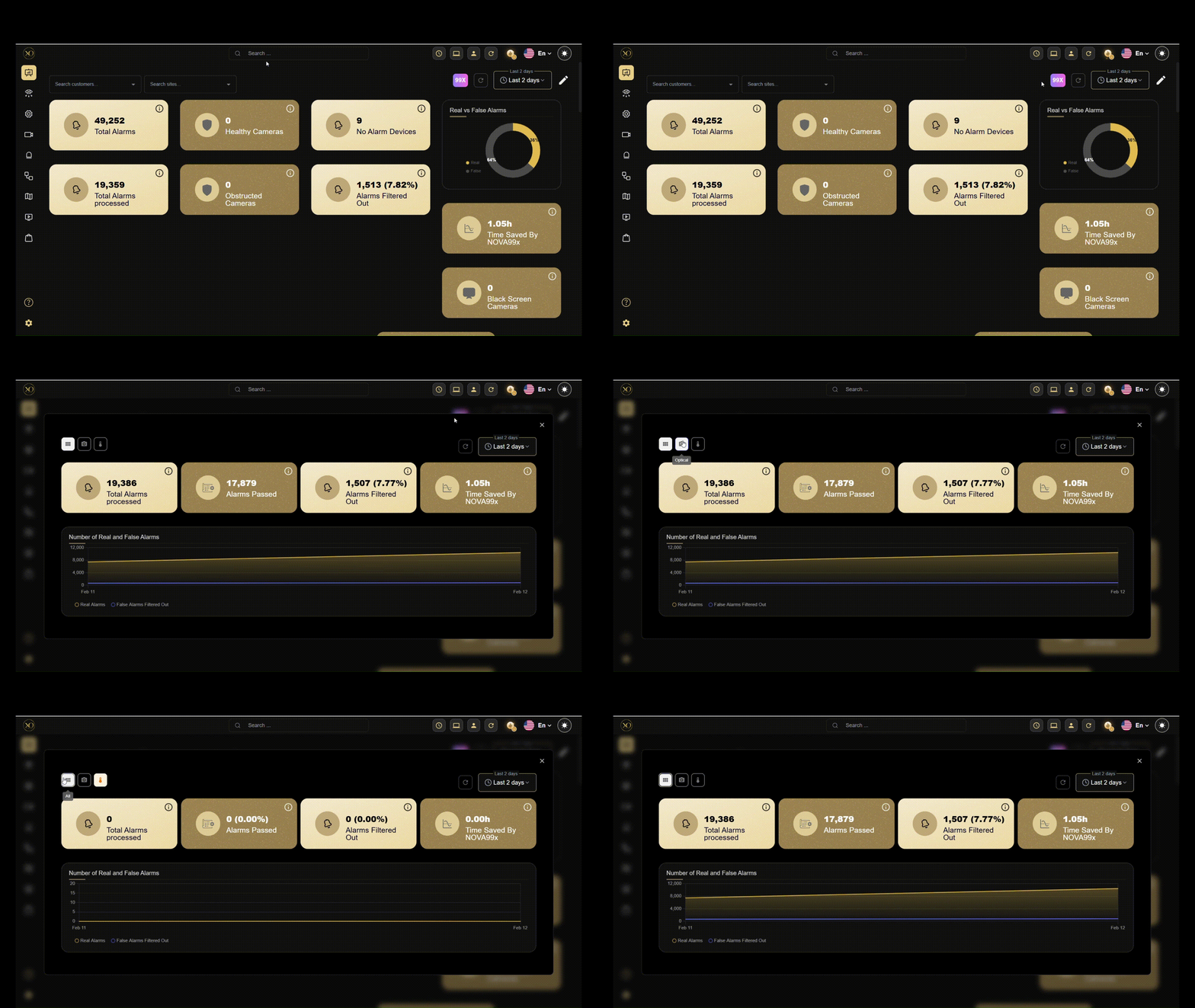
Adjust the time range, compare real vs. false alarms, and filter events by camera type (thermal or optical) to quickly understand what’s happening across your system.
NOVA99x runs three core algorithms to achieve this:
Advanced Object Detector achieves state-of-the-art performance in real-world surveillance conditions, identifying relevant objects with high accuracy.
Dynamic Motion Detection pinpoints meaningful movement within an event and filters out environmental noise like shadows, reflections, and weather artifacts.
Tracking and Re-Identification (ReID) adds temporal context to each event, filtering out stationary objects like parked vehicles that would otherwise trigger repeated false alarms.
Key Capabilities
| Capability | Description |
|---|---|
| False-Alarm Filtering | Filters up to 99% of non-actionable alarms before they reach operators, eliminating noise at scale. |
| Operator Focus Protection | Removes repetitive, low-value alarms to prevent alert fatigue and keep teams sharp on genuine threats. |
| Scalable Operations | Enables teams to manage more customers, sites, and devices without adding headcount. |
| Response Quality | Ensures real incidents are surfaced quickly and not buried under alarm noise. |
NOVA99x operates at every level of the GCXONE entity hierarchy. Lower-level entities automatically inherit configuration from higher levels unless explicitly overridden.
| Level | Scope & Purpose |
|---|---|
| Service Provider | Global noise control across all customers in the tenant. |
| Customer | Filtering tailored to a specific organization's needs. |
| Site | Handles local environmental conditions unique to a physical location. |
| Device | Camera-specific behavior overrides. |
| Sensor | Precise control over individual alarm sources. |
A single service-provider-level policy can cover entire operations with zero additional configuration.
Real-World Use Cases
- Service Provider-Wide Noise Control A service provider deploys NOVA99x at the top level, enforcing a baseline alarm quality standard across all customers. No single noisy deployment can overwhelm the shared operations team.
- Customer-Level Alarm Policies Filtering is tailored per customer based on risk tolerance or contractual requirements, without affecting any other customer.
- Site-Level Environmental Filtering A site with complex lighting or high foot traffic gets its own configuration to handle unique environmental conditions without touching the rest of the system.
- Device and Sensor Precision Control A problematic camera is fine-tuned individually. No impact on the rest of the site.
- Large-Scale Expansion During rapid onboarding, NOVA99x stabilizes alarm volume from day one, preventing early overload and maintaining quality as the operation grows.
Best Practices
To achieve optimal performance, consider the following best practices:
- Optical (RGB) cameras: Verify all cameras meet the minimum technical requirements before activating. Detection accuracy depends directly on image quality at the sensor level.
- Thermal cameras: Configure the sensor as Thermal in GCXONE before activating NOVA99x. This activates the correct detection model. Keep tall heat-emitting objects like chimneys and vents out of the field of view as they can resemble a human profile. If excessive contrast enhancement introduces false detections, enable
useContrastEnhancementfor the sensor. Note that cats and small animals share similar heat profiles to humans and may occasionally be misclassified. - Night detection: Cameras without IR are best suited for indoor use. Outdoor deployment may require additional lighting. Cameras with IR night vision have a reduced effective field of view in low-light mode, requiring a minimum bounding box of 600 px² for person detection.
- High-speed vehicle scenarios: For cameras monitoring fast-moving or turning vehicles, set
carBypassDisplacementCheck = true. This bypasses ReID and uses motion-box intersection instead. Do not apply this setting to parking lot cameras as it reduces jitter filtering.
| Parameter | Requirement |
|---|---|
| Image Resolution | Minimum 640 × 480 px. Cameras below 336 × 190 may have detection blind spots. |
| Lighting | 300–1,000 lux, or average pixel intensity ≥ 30%. |
| Person Detection | Bounding box area ≥ 300 px² (or ≥ 0.3% of total image area). At night with IR, minimum 600 px². |
| Vehicle Detection | Vehicle must appear in at least 2 of 3 consecutive frames. Re-Identification (ReID) required. |
| Supported Vehicles | Cars, sedans, vans, trucks, buses, forklifts, bulldozers, excavators. |
| Image Quality | Avoid motion blur, glare, rain, or lens contamination — these significantly reduce accuracy. |
Additional Details
Activation
Administrator access is required. The activating user must have permissions for the selected entity level.
- Log in to GCXONE as an administrator.
- Navigate to Marketplace from the main menu.
- Select Apps and locate NOVA99x.
- Click Explore, then Proceed.
- When prompted to save the subscription, click Yes.
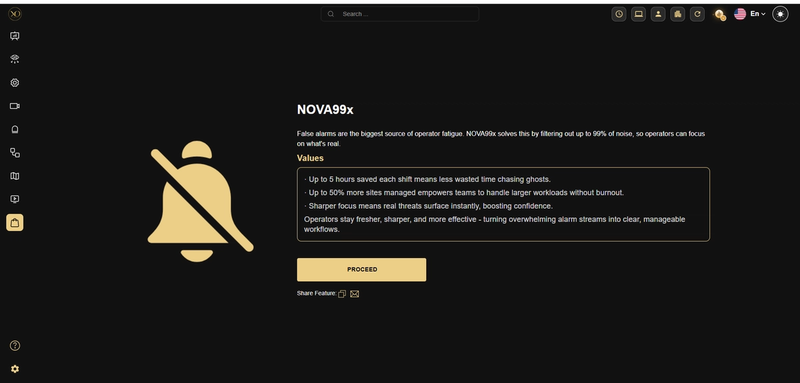
NOVA99x will appear under My Subscriptions and is immediately active for your tenant.
Roles and responsibilities
| Role | Responsibilities |
|---|---|
| System Administrators | Configure NOVA99x at the appropriate entity level; balance noise reduction with detection coverage; monitor alarm volume impact. |
| Operators | Benefit from reduced alarm noise. Do not manage NOVA99x configuration unless granted explicit permissions. |
| Supervisors & Team Leads | Monitor performance improvements and validate that filtering aligns with operational goals. |
| Customer Success | Use NOVA99x results to demonstrate scalability and value to end customers. |
Scope and limitations
- NOVA99x filters motion-triggered alarms using computer vision before they reach operators. It reduces false alarms by up to 99% across any entity level in GCXONE. Configuration changes take effect immediately.
- NOVA99x does not replace detection analytics, camera hardware configuration, or physical security measures. It does not guarantee 100% false alarm removal as complex edge cases may still pass through. It does not replace live human monitoring or override compliance rules. It is not a reporting or predictive analytics tool.
NOVA99x controls alarm noise before alarms reach operators. ZenMode supports historical analysis and learning after alarms occur. Together, they address both real-time scale and long-term optimization of security operations.