Reporting Overview
What Reporting Does
GCXONE has three reporting surfaces. Each serves a different purpose and a different audience. Sending the wrong report type to the wrong person — or reporting nothing at all — is the most common source of customer dissatisfaction in monitoring deployments.
Why It Matters
The right report delivered to the right person at the right time is what separates a professional monitoring operation from one that loses customers. HealthCheck reports prove your cameras are working. Alarm reports prove your AI is delivering value. The dashboard keeps your team sharp daily.
How It Works
1. The Live Dashboard — for your team, not your customers
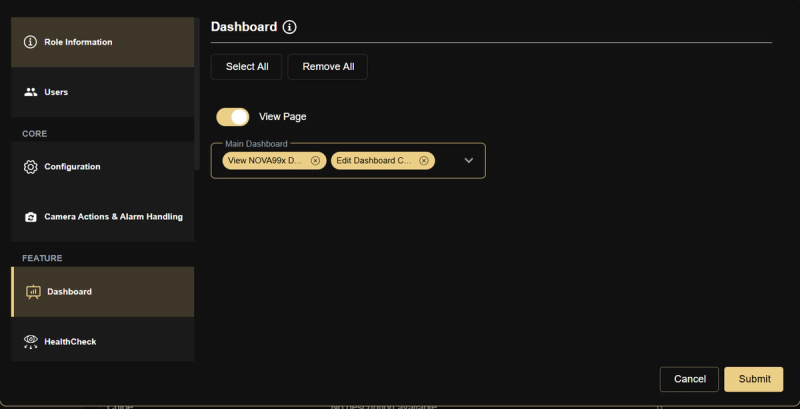
The dashboard is real-time. It shows what is happening right now across all sites in your selected time window (default: last 2 days). Use it for daily operational monitoring and internal team briefings.
The four metrics that require daily attention:
- Unhealthy Cameras — cameras that failed their last HealthCheck. They are not currently monitoring anything. Any non-zero count needs investigation.
- No Reference Images — cameras NOVA99x cannot compare against a baseline. Every camera here is running without AI filtering, increasing your false alarm rate.
- Real vs False Alarm ratio — a healthy deployment runs at 75–85% false alarm filtration by NOVA99x. Above 30% real alarms is a signal that something in the pipeline is misconfigured.
- Devices with Events Having No Images — alarms from these cameras are unverifiable. Flag them for reference image calibration.
The dashboard does not store historical data in a shareable format. Do not screenshot it and send it to customers as a report.
2. HealthCheck Reports — your primary customer deliverable
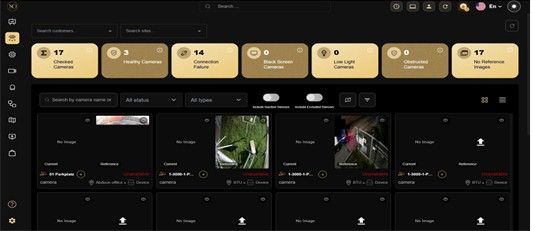
HealthCheck reports are timestamped, independent records of camera estate health. They answer the question every customer asks: "Are all my cameras working?" They are designed for non-technical stakeholders — facility managers, security directors, operations teams.
Use HealthCheck reports:
- Weekly, for every active customer — on a scheduled cadence
- After any maintenance event or site change — to confirm cameras were restored correctly
- For SLA compliance — as proof of uptime monitoring
- Before and after new site commissioning — to baseline the estate
For the full HealthCheck report workflow — how to generate, read, and act on results — see: Standard Reports.
3. Alarm & Operational Reports — for management and trend analysis
Alarm reports aggregate event data over a time period: total alarms by site, alarm type breakdown, response time metrics. Configure them under Settings → Reports.
Use alarm reports for:
- Monthly customer reviews — showing alarm volume trends and AI filtration value over time
- Identifying noisy devices — a single device with 1,000+ monthly events usually has a misconfigured sensor or is pointing at a tree
- Demonstrating NOVA99x value — the reduction from raw motion events to verified alarms is a key commercial differentiator worth quantifying for customers
- Internal team performance — response time and resolution rate metrics
Key Capabilities
Scheduling Defaults
Set up report schedules proactively for every active customer. Do not wait for them to ask. The standard cadence:
- HealthCheck report: weekly, delivered Monday before 08:00
- Alarm summary: monthly, delivered on the first business day
Both are configured under Settings → Reports. Scheduled reports deliver automatically — the customer receives them as email attachments and does not need GCXONE access.
The Audit Log
The Audit log in Configuration is not a customer-facing report. It is an internal admin tool that records every configuration change: who changed what, and when. Use it to investigate incidents, track onboarding changes, and satisfy compliance requirements for change logging.
Real-World Use Cases
- A facility manager asks "are all my cameras working?" — admin sends a scheduled weekly HealthCheck report without needing to log into GCXONE.
- A service provider uses monthly alarm reports to show a customer how NOVA99x reduced their false alarm volume by 80% over three months.
- An admin notices a single device generating 1,200 events in one month — alarm reports surface it immediately as a misconfigured sensor.
- After a maintenance visit, the technician triggers a HealthCheck report to confirm all cameras were restored correctly before leaving the site.
Best Practices
- Set up scheduled reports for every active customer on day one — do not wait for them to ask.
- Never send a dashboard screenshot to a customer as a substitute for a HealthCheck report.
- Deliver HealthCheck reports weekly, alarm summaries monthly — consistently, without prompting.
- Use the Audit Log proactively after any configuration change to confirm what was modified and by whom.
- Flag any Real Alarm ratio above 30% immediately — it signals a misconfiguration in the pipeline, not a genuine security surge.