Isolate
What Isolate Does
The Isolate function allows you to temporarily disable alarms from a specific sensor for a defined period of time (e.g., 5 minutes, 30 minutes, 1 hour, or more). During this time, alarms from that sensor will be suppressed. Once the isolation period ends, the sensor automatically resumes normal operation and alarm generation.
Why It Matters
This is especially useful in situations where normal activity would otherwise trigger unnecessary alarms. For example, if maintenance work, construction, or other planned activities are taking place in the area covered by a camera or sensor, multiple alarms may be generated due to increased movement. Instead of receiving and managing these non-relevant alarms, you can isolate the sensor for a selected duration.
How It Works
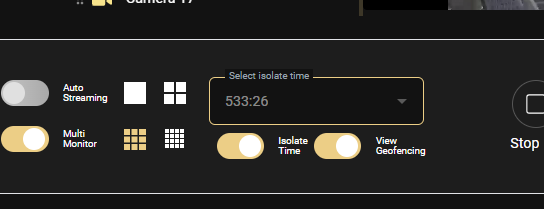
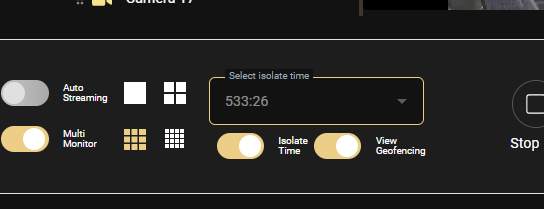
Isolate is controlled from the bottom toolbar in the Video Viewer:
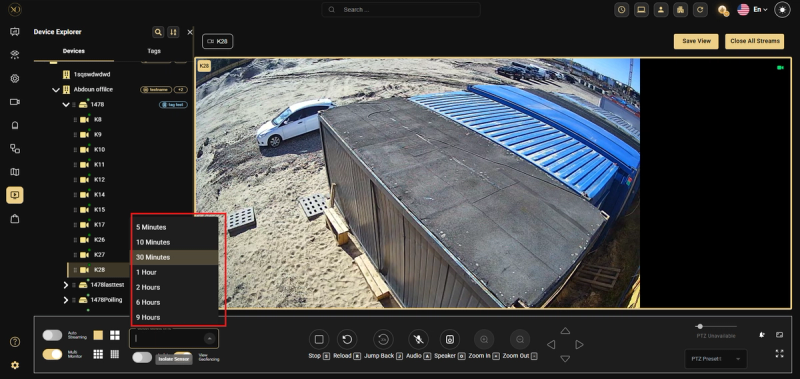
- Select Isolate Time — Choose the duration for the isolate period before enabling
- Isolate Sensor toggle — Enable to activate Isolate on the selected camera
When Isolate is active, all other camera streams in the Video Viewer are hidden. The view automatically returns to normal when the selected time period ends. The operator can also disable Isolate manually at any time by toggling it off.
Isolate mode keeps its state and timer even if you close the camera view. The timer runs independently in the background — when you reopen the stream, the isolate state remains active if it hasn't expired, the timer resumes from where it left off, and the remaining time is displayed immediately.
Isolate Time Options
- 5 Minutes
- 10 Minutes
- 30 Minutes
- 1 Hour
- 2 Hours
- 6 Hours
- 9 Hours
Real-World Use Cases
- A maintenance team is working inside a facility. The sensor in that area is isolated for 2 hours to prevent unnecessary alarms from being triggered by their movement
- Construction work is taking place near an outdoor camera. The operator isolates the sensor for 1 hour so the system does not generate alarms during the scheduled activity
- A cleaning crew performs their routine inside a monitored zone after hours. The supervisor isolates the relevant sensor for 30 minutes to avoid a flood of false alarms during that period
Best Practices
- Select the isolate duration before activating the toggle to avoid interruptions
- Use shorter durations (5–10 minutes) for quick checks and longer durations (1–2 hours) for extended monitoring
- Disable Isolate manually as soon as the situation is resolved to restore full site visibility