Event Clips Overview
What Event Clips Does
Event Clips (also known as Alarm Clips) automatically capture short video segments whenever an alarm or motion event is triggered.
Instead of just receiving an alert, operators can immediately see what actually happened _pre-event, event moment, and post-event _, without needing to search through recorded footage.
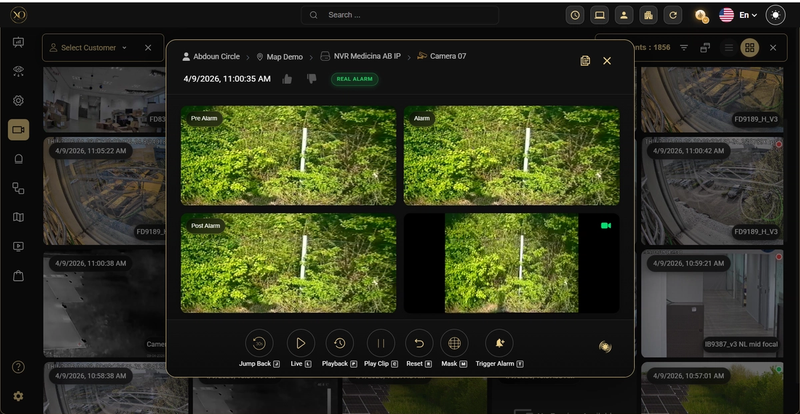
Figure 1 : Event clip attached to an alarm.
Why It Matters
When an alarm is triggered, speed and clarity are critical.
Without Event Clips, operators typically have to manually review recordings to understand the situation. This slows down response time and adds unnecessary effort.
Event Clips remove that friction by attaching video directly to the alarm. This allows operators to quickly verify events, reduce false alarms, and respond with confidence.
How It Works
Event Clips rely on a buffer-based recording approach.
Devices continuously maintain a short recording buffer. When an alarm is triggered, the system extracts a video segment that includes both pre- and post-event footage.
The event clip is attached to the alarm and presented using synchronized views that show pre-event, event moment, and post-event context. If AI is enabled, the clip can also be analyzed and enriched with detection results before being presented to the operator.
Operators can also switch between live view and playback, allowing them to compare real-time activity with recorded event clips.
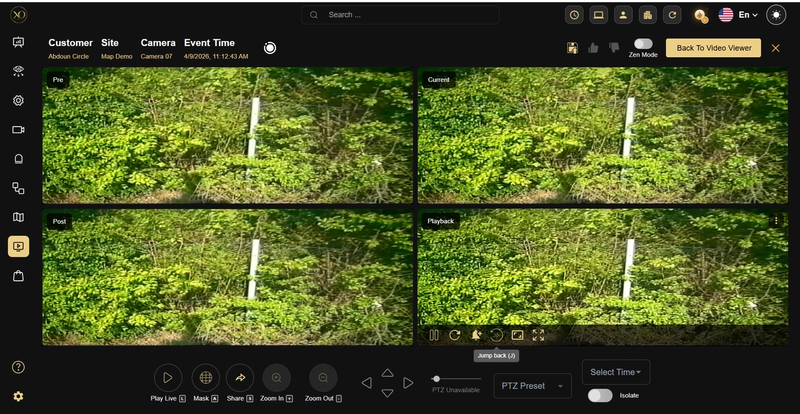
Figure 3: Playback view of an event clip, enabling operators to navigate through pre-event, event, and post-event footage
Key Capabilities
- Automatic Clip Capture – Clips are generated automatically when an alarm is triggered
- Pre- and Post-Event Context – Each clip includes footage from pre and post the event
- AI Integration – Clips can be analyzed to help classify events and reduce false alarms
- Instant Access – Clips are attached directly to alarms for immediate review
- Configurable Triggers – Clip capture can be limited to specific alarm types
Real-World Use Cases
- An intrusion alarm is triggered, and the operator can instantly see what happened without searching through recordings
- A false alarm is quickly dismissed after reviewing the attached clip
- Operators process alarm queues faster because each alarm already includes visual context
- AI analyzes clips in advance, helping confirm whether an event is real before the operator even opens it
Best Practices
- Use at least 5 seconds of pre-alarm recording, since events rarely start exactly at the trigger point.
- For better results, consider extending clips to 15 seconds before and after the event (~30 seconds total).
- Use continuous recording whenever possible to ensure full context is always available.
- Focus clip capture on important alarm types to avoid unnecessary storage usage.
- Regularly monitor storage and retention settings, especially in high-alarm environments.
Additional Details
- Event Clips depend on device capabilities, including recording support and buffer availability.
- Supported devices include ADPRO, Axis, Dahua and Milestone.
- Some battery-powered devices (such as Ajax or Reconeyez) may provide images instead of video clips due to hardware limitations.
- Clip generation can be controlled using device-level configuration, including enabling recording and defining which alarm types should trigger clips.
- Typical clip duration is around 10 seconds (5s before + 5s after), but can be adjusted based on site requirements and network conditions.