TowerGuard
What TowerGuard Does
TowerGuard is a centralized monitoring platform built into GCXONE for mobile tower infrastructure. It gives operators full visibility into tower status, health, and device activity across all tower sites from a single interface. It is hardware-agnostic, cloud-powered, and built to scale across clients, geographies, and environments.
Why It Matters
Managing tower sites across multiple systems creates blind spots, slow response times, and costly downtime. When power, connectivity, or storage issues go undetected, the problem compounds fast.
TowerGuard puts every tower in one place. Operators see real-time status across the entire fleet, get alerted the moment something goes wrong, and respond before issues escalate.
How It Works
TowerGuard collects real-time data from connected devices at each tower site, tracking power, connectivity, storage, and device health. The platform alerts operators when abnormal conditions are detected.
Towers are created using customizable templates, so teams can standardize configurations and scale management across multiple sites.
A. Create Tower
-
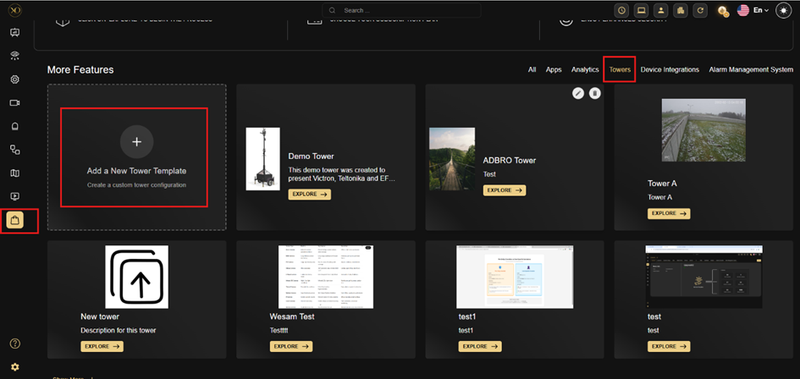
Go to Marketplace → Tower
-
add a new Tower templa
-
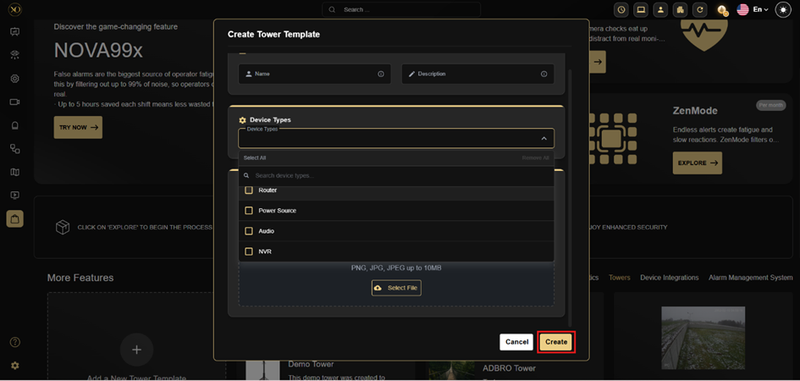
Fill in the required information.
-
Click Create
-
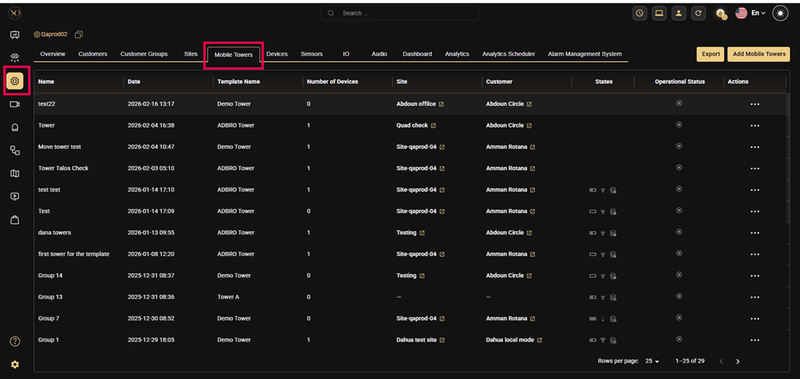
Navigate to Configuration → Mobile Towers
-
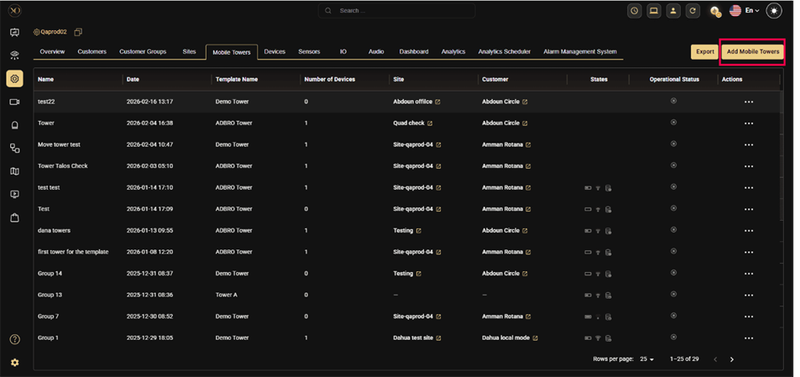
Click Add Mobile Tower
-
Select your tower template
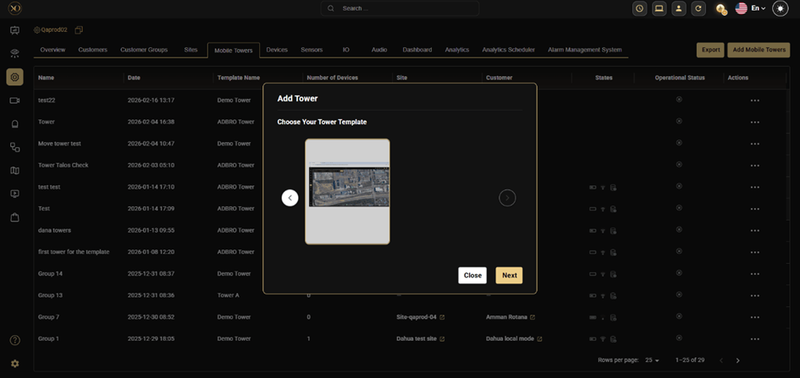
-
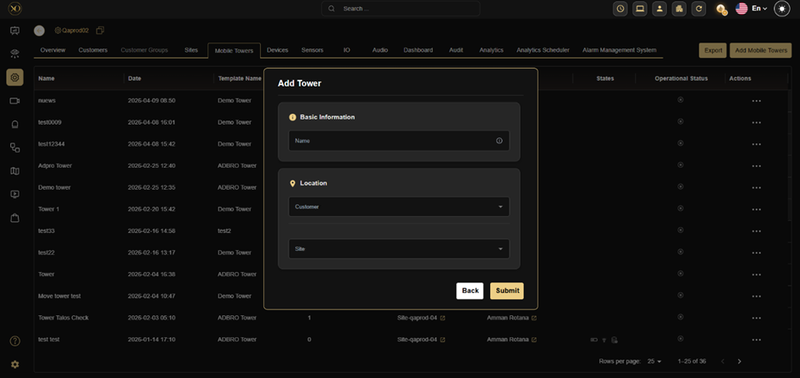
Fill in the required information and click Submit
- Basic information: Name
- Location: customer, site
- Select configure new device then Select device types
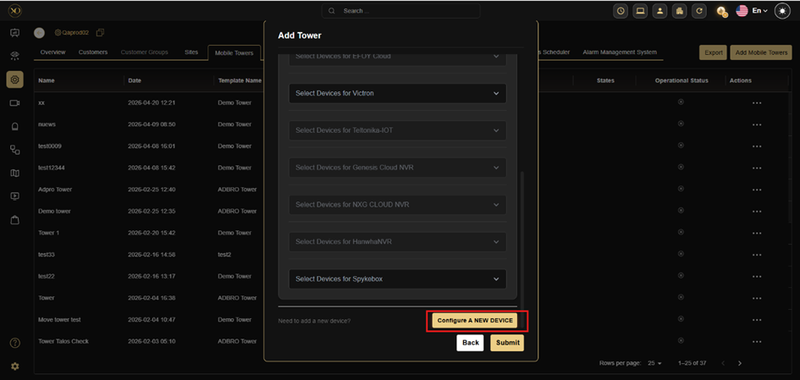
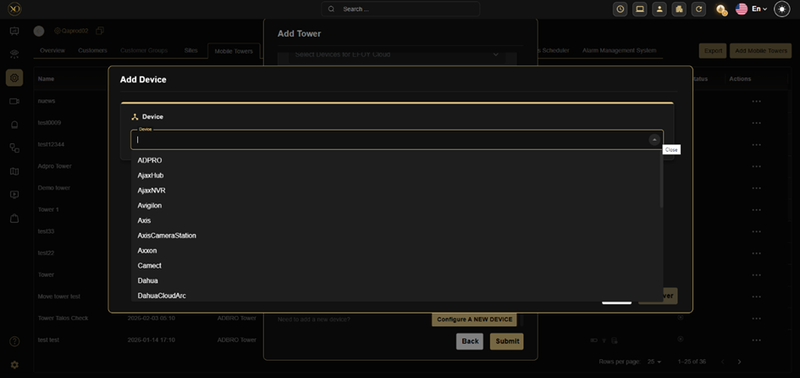
- click Submit
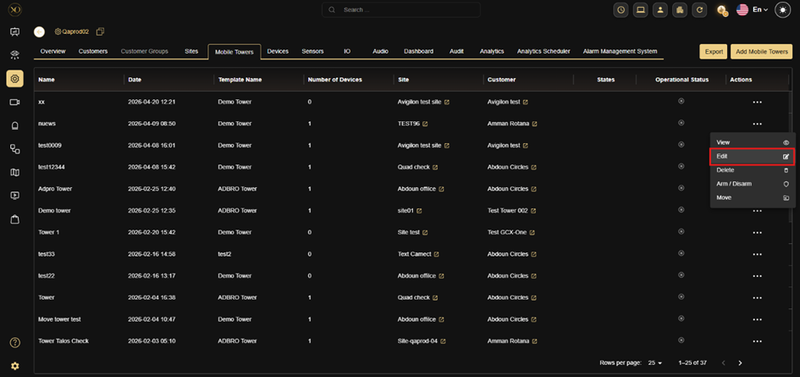
The TowerGuard interface displays a list of all configured towers, showing the tower name and creation date, template name, number of devices added, and the associated site and customer. Operators can view operational status instantly and investigate issues directly from the list.
B. Modify tower
-
Edit tower
-
Go to Configuration → Mobile Towers
-
Find the tower you want to update
-
Click the three dots (⋯) next to it and select Edit
-
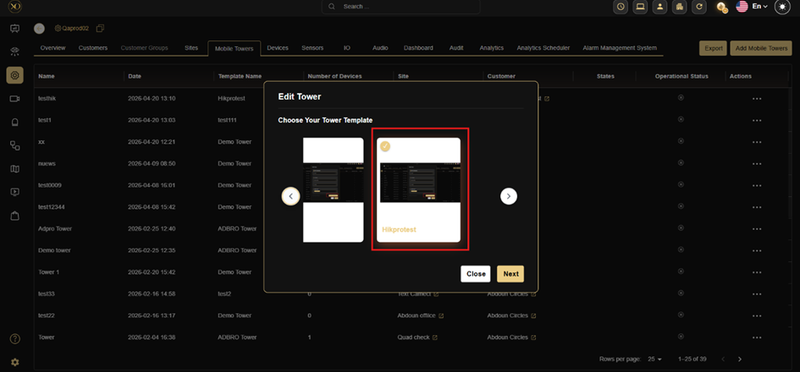
select the tower template
-
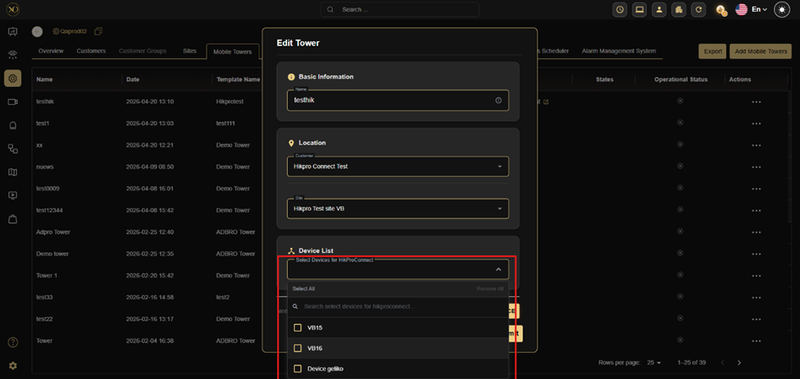
Update the tower details as needed (e.g., name, location)
-
In the Device List section:
-
Add devices by selecting them from the list
-
Remove devices by unchecking them
-
You can also configure newly added devices if needed
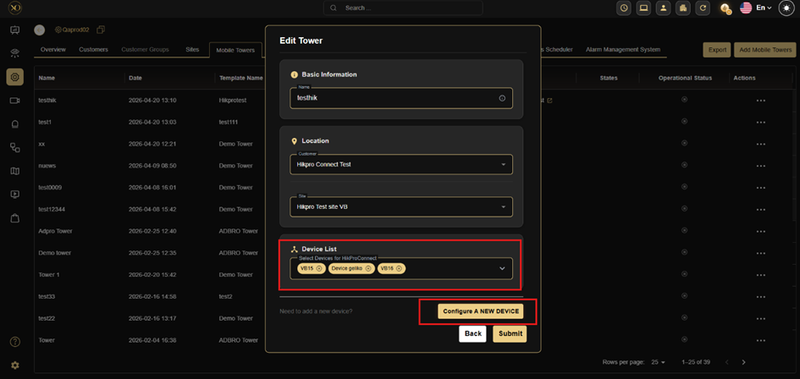
- Click Save to apply the changes
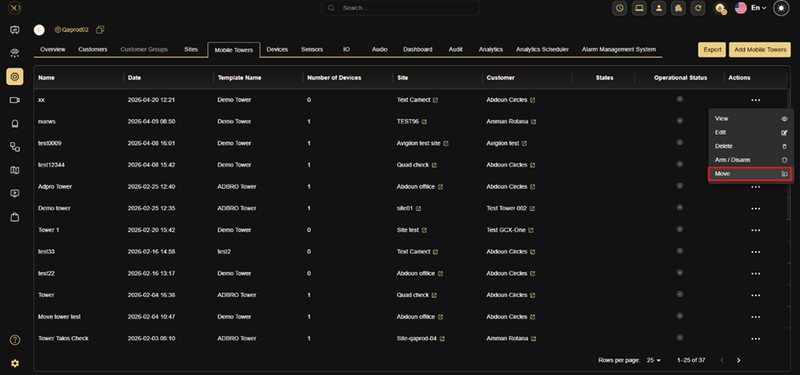
2. Move tower
- Go to Configuration → Mobile Towers
- Find the tower you want to move
- Click the three dots (⋯) next to it and select Move
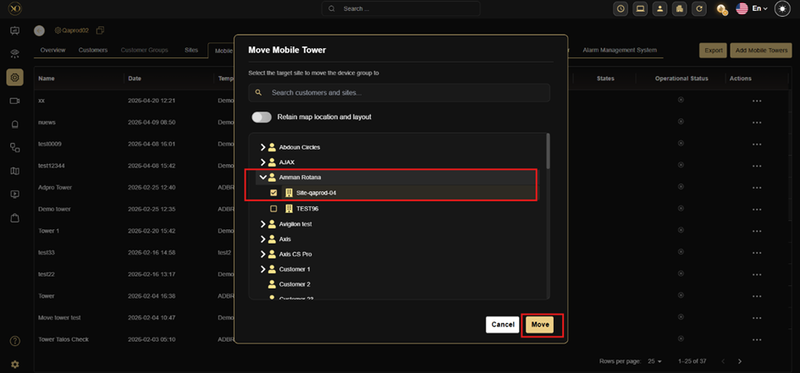
- In the popup window, choose the target customer/site
- (Optional) Enable “Retain map location and layout” if needed
- Click Move to confirm
The tower will be moved to the selected location.
3. Remove tower
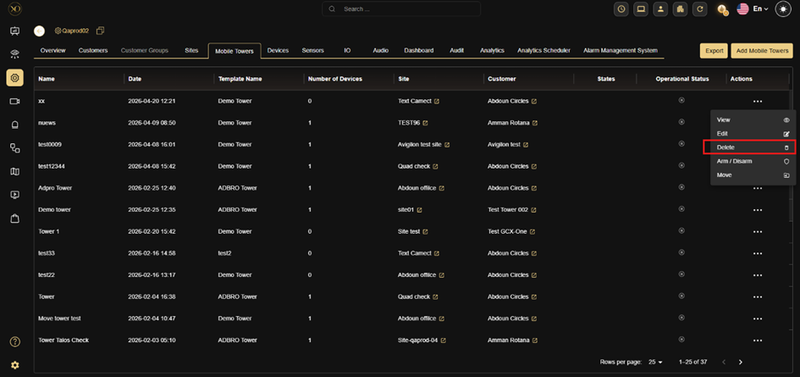
- Go to Configuration → Mobile Towers
- Find the tower you want to remove from the list
- Click the three dots (⋯) next to it
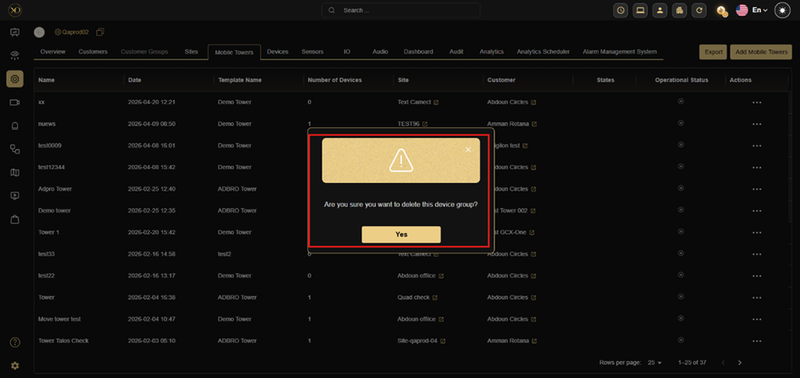
- Select Delete
- Confirm the action when prompted
Key Capabilities
TowerGuard supports five tower types to fit different deployment scenarios:
1. Fixed Surveillance Towers Permanent, hard-mounted towers typically installed at critical infrastructure sites such as airports, ports, borders, and industrial plants.
- Rugged steel or concrete construction
- Supports high payloads (cameras, radars, sensors)
- Continuous power and network connection
- Often integrated with VMS and access control
Best for: Long-term, high-security locations requiring 24/7 monitoring and data retention.
2. Solar-Powered (Hybrid) Towers Self-sustained towers powered by solar panels and battery storage, with optional generator backup.
- Sensor Health monitoring and system reliability
- Solar Monitoring with charging insights
- Proactive Alerts for downtime prevention
- System Diagnostics and health insights
Best for: Remote or off-grid locations where continuous power supply is unavailable.
3. Mobile Towers Trailer-based or vehicle-mounted towers that can be deployed quickly and repositioned as needed.
- Telescopic or mast design (up to 10m height)
- Onboard power (generator or battery)
- LTE/4G/5G or satellite connectivity
- Rapid deployment - no fixed infrastructure required
Best for: Construction sites, events, law enforcement, and remote areas needing temporary monitoring.
4. Smart Cloud Tower Intelligent surveillance platforms with integrated IoT sensors, analytics, and cloud-based management.
- Cloud video storage and remote access
- AI-driven detection (people, vehicles, anomalies)
- Automated alerts and health monitoring
- Centralized fleet management and scalability
Best for: Enterprises seeking real-time oversight across multiple sites or regions.
5. Autonomous AI Tower Next-generation towers combining AI, computer vision, and machine learning for fully automated surveillance.
- Edge AI processors for instant threat detection
- Autonomous pan/zoom tracking
- Integration with drones and mobile apps
- Predictive maintenance and smart alerts
Best for: Critical infrastructure, defense, border control, and smart city environments.
Platform features
- Fleet Dashboard — Complete fleet visibility with real-time command view showing each unit's online/offline state, battery level, solar charging, connectivity, and alerts.
- Remote Device Control — Control devices remotely from anywhere.
- Alarm Management — Reduce false alarms and manage alarm activity.
- AI Video Monitoring — Detect real threats faster with AI-powered analysis.
- System Health & IoT — Monitor device health and integrate with external IoT devices including access gates, motion sensors, and fire/flood detectors.
- Fleet Management — Manage assets efficiently across large deployments.
- Scalable & Multi-Tenant — Scale without limits across clients, geographies, and environments.
- Web & Mobile Access — Access anytime, anywhere via web dashboard or mobile app.
| Differentiator | Description |
|---|---|
| AI Automation | Reduces false alarms from wildlife, weather, and environmental factors while automating fleet maintenance planning |
| Unified Surveillance | Single platform view across all tower sites and devices |
| Hardware Agnostic | Works across multiple brands such as LINC, WCCTV, and next-gen drone or robot platforms |
| Mobile & Web | Accessible across devices ensuring open compatibility |
| Branded Experience | Supports white-label deployments for security service providers and enterprise customers |
Real-World Use Cases
Remote Tower Monitoring Operators can monitor the operational status of unmanned tower sites without needing to be on-site — tracking power, connectivity, and device health from a central dashboard.
Tower Fleet Management Teams managing multiple towers across different sites can use TowerGuard to get a unified view of all towers, quickly identifying which sites need attention.
Proactive Issue Detection TowerGuard alerts operators when abnormal conditions are detected — such as connectivity loss or storage issues — enabling faster response before problems escalate.
For Installers Tower installations often drag out due to complex configuration. TowerGuard streamlines setup, cutting 1–2 days from every install. The TowerGuard dashboard allows users to add, remove, modify, and deploy towers in just a few easy steps:
- Plug-and-play deployments enable faster handovers
- Fewer callbacks lead to cleaner installs from day one
- Happier clients experience immediate value
Additional Details
TowerGuard gives teams full tower visibility in one place. Status across power, connectivity, and storage appears instantly. It reduces downtime, improves remote operations, and eliminates manual site management.
The platform scales across clients, geographies, and environments. It supports multiple customer fleets with plug-and-play onboarding for rapid deployment.