Marketplace
What Marketplace Does
Marketplace is GCXONE's built-in app store. You browse, activate, and manage premium features without filing IT requests or waiting on anyone. Most features are live within minutes of activation.
Why It Matters
Enabling a single premium feature used to take 5 to 8 hours of admin time. That's a real problem when you're trying to move fast.
Marketplace cuts that down to minutes. Teams using it see 95% less admin workload, 2x revenue per site when the right features are active, and over 3,500 euros saved annually from reduced support overhead. Your IT team stops being the bottleneck, and admins handle it themselves.
How It Works
Open Marketplace from inside GCXONE. Features are grouped into five categories: Apps, Analytics, Towers, Device Integrations, and Alarm Management System.
Each listing shows you what the feature does and lets you activate it directly. Click to activate and policies and permissions apply automatically. No manual configuration needed.
Key Capabilities
- Browse by category: Apps, Analytics, Towers, Device Integrations, and Alarm Management System
- One-click activation, features go live in minutes, not hours
- Policies and permissions apply automatically after activation
- Accessible to Admins, Operators, Installers, IT, GM/Sales, and Tower Operators
- Available features: TimeSync, TowerGuard, BulkImport, ZenMode, Nova99X, HealthCheck Basic, HealthCheck Advanced, and HealthCheck Plus
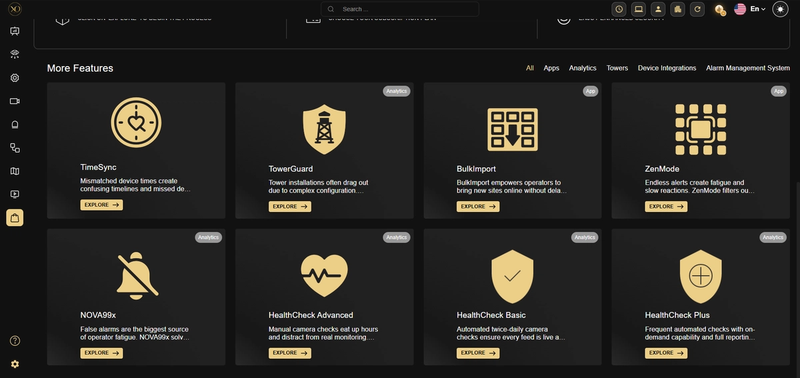
Figure 1: Available Features
Real-World Use Cases
- An admin onboarding a new site needs three features active before end of day. All three go live in one session, no tickets, no waiting on IT.
- An IT team buried under activation requests from 40 sites shifts responsibility to designated admins and the queue clears up fast.
- A GM needs to roll out a revenue feature across thousands of sites. One operation in Marketplace handles it.
- An operations team wants every location running the same setup. They standardize through Marketplace and stop chasing inconsistencies manually.
Best Practices
- Check the feature tier before activating. Basic, Advanced, and Plus work differently, and picking the wrong one means doing it again.
- Assign one admin per account to own activations. It keeps things consistent and avoids conflicting setups.
- After activation, verify that permissions applied correctly for each role involved. It's a quick check that saves bigger problems later.