Universal Search
What Universal Search Does
Universal Search lets you find any entity in GCXONE instantly by name. Instead of navigating through layers of menus, you type what you're looking for and jump directly to it, from any screen in the platform.
Why It Matters
In large deployments, finding a specific site, device, or customer through menus takes time you often don't have. During an active investigation, every second matters. Universal Search removes that friction entirely, keeping operators focused and efficient by putting every entity just one search away.
How It Works
- Click the Search bar at the top of the GCXONE interface.
- Type the name of what you're looking for.
- Select the result and jump directly to it.
No menus, no layers, no extra clicks.
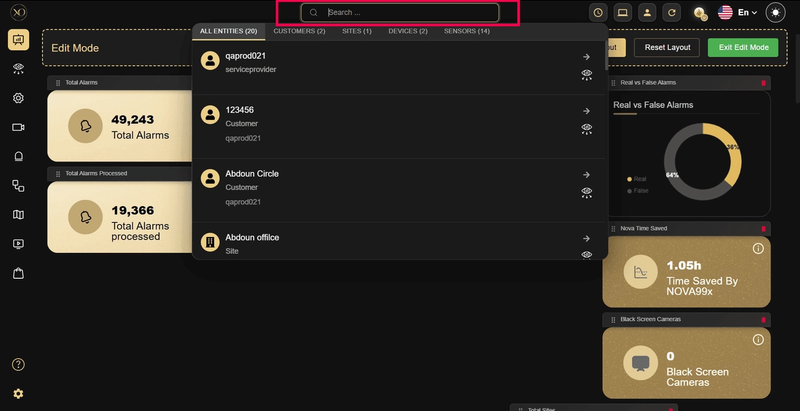
Figure 1: Universal search
Key Capabilities
Universal Search works across all major entity types:
- Customers: Find any customer account instantly
- Sites: Navigate directly to any site by name
- Devices: Locate any connected device in seconds
- Sensors and Cameras: Jump straight to a specific camera or sensor
Additional benefits:
- Available from any screen in GCXONE, at any time
- Works across all entity levels in a single search
- Cuts navigation time significantly during investigations and day-to-day operations
Real-World Use Cases
- An alarm triggers during an active incident. The operator types the site name into Universal Search and jumps directly to the relevant camera, no menus, no clicks, no delay.
- A service provider managing hundreds of customers and sites stops scrolling through long lists. They search by name and reach any account or location instantly.
- A technician troubleshooting a device remotely searches for it by name, pulls up its configuration and status immediately, and resolves the issue faster.