CustomView
What CustomView Does
CustomView lets you personalize your GCXONE dashboard based on your role. Drag, drop, and rearrange widgets to build a workspace that fits your workflow.
Every user gets a tailored interface. No generic screens, no irrelevant data.
Why It Matters
A one-size-fits-all dashboard forces users to work around information that has nothing to do with their job. CustomView removes that friction. Every user sees only what matters to their role, nothing more and nothing less.
How It Works
Click the edit icon in the top right to enter edit mode.
- Drag widgets to reposition them anywhere on the dashboard
- Add a widget by selecting from available options (e.g., Real vs False vs Technical Alarms).
- Click Save Layout to save your custom dashboard
- Click Reset Layout to return to the default dashboard at any time
A search bar is available to find customers and sites directly from a single input — no more scrolling through long lists. The Customer → Site selector flow is clearer and faster to narrow down to the exact scope you need. The selected Customer and Site persist as you move between Dashboard, HealthCheck, Video Search, Maps, and Configuration — pick a site once and it stays selected wherever you go.
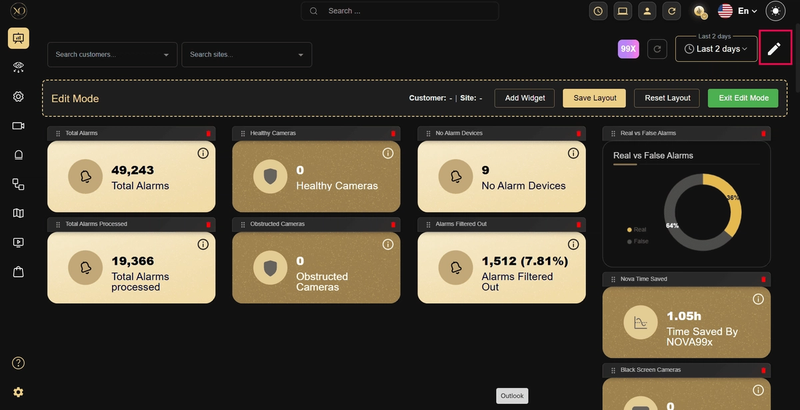
Figure 1: Dashboard Edit Mode.
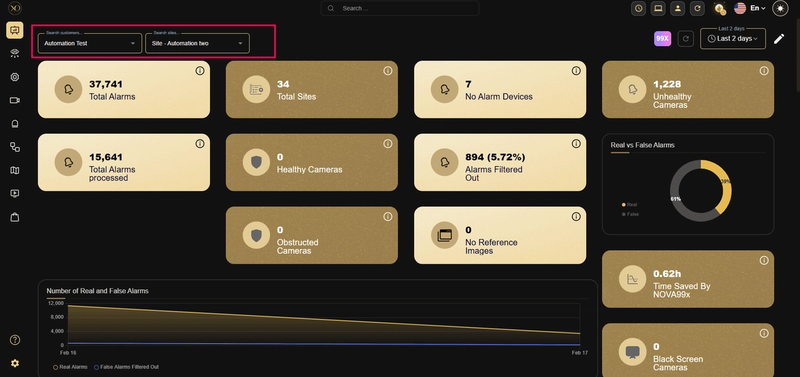
Figure 2: Custom Widget Layout.
Key Capabilities
Role-based defaults:
- Operators: Alarm widgets and real-time event feeds front and center.
- Managers and Admins: KPIs, alarm trends, and performance summaries.
- Technicians: Device health and connectivity status.
- Sales and GM: High-level performance metrics and customer overviews.
Additional capabilities:
- Build and save custom layouts in minutes with no heavy setup.
- Reset to default at any time without losing saved layouts.
- Filter any dashboard view by customer or site instantly.
- Support compliance reviews with trusted, role-appropriate visuals.
| Role | What They Need |
|---|---|
| Operators | Alarm widgets and real-time event feeds |
| Managers / Admins | KPIs, alarm trends, and performance summaries |
| Technicians | Device health and connectivity status |
| Sales / GM | High-level performance metrics and customer overviews |
Real-World Use Cases
- An operator handles high-pressure incidents. They arrange alarm widgets front and center, eliminating the need to navigate away during active events.
- A manager runs a weekly operational review. Their dashboard shows KPIs and trends at a glance.
- A service provider monitors multiple customers from one dashboard. They use the Customer and Site selectors to switch between accounts instantly.
- An admin builds a compliance-ready dashboard with trusted visuals. The layout supports accuracy across all reporting requirements.