AI Analytics Overview
What AI Analytics Does
AI Analytics in GCXONE uses artificial intelligence to analyze video events and distinguish real threats from environmental noise.
It processes incoming events in real time, identifying objects and evaluating their behavior before determining whether an event should be treated as a real alarm or suppressed.
- Reduces false alarms by up to 99%.
- Processes every event in real time before it reaches an operator.
- Identifies objects and evaluates behavior automatically.
- Ensures operators only see meaningful and actionable events.
Why It Matters
In many surveillance environments, most alarms are not real threats.
They are triggered by environmental factors such as lighting changes, weather conditions, reflections, or irrelevant objects. Over time, this creates alarm fatigue, slows down response times, and increases the risk of missing critical incidents.
AI Analytics solves this by applying intelligent filtering and decision logic to every event.
Instead of reacting to noise, operators only see events that have been analyzed and validated, improving accuracy, efficiency, and overall operational performance.
How It Works
AI Analytics processes each video event in two stages.
Identification The system detects and identifies all objects in the scene such as people, vehicles, or animals.
Decision After identification, the system applies predefined logic to determine whether the event should be considered a real alarm or suppressed.
This decision is based on configurable parameters:
- Priority List — Objects that always trigger a real alarm
- White List — Objects that may trigger alarms based on behavior
- Black List — Objects that are always ignored
- Reject Unknown — Filters environmental triggers such as wind or reflections
Only validated alarms are passed to operators, while false alarms are automatically suppressed.
Key Capabilities
- False Alarm Reduction — Reduces false alarms by up to 80–95% using AI-based filtering
- Object Classification — Detects and classifies people, vehicles, animals, and other objects in real time
- Rule-Based Decision Logic — Configurable lists control exactly which objects trigger alarms
- Behavioral Analysis — Evaluates movement patterns and activity over time
- Real-Time Processing — Analyzes events as they occur with no manual triggers required
AI-Powered False Alarm Filtering
AI Analytics filters out non-relevant triggers before they reach the operator, including lighting changes and shadows, camera vibration or movement, reflections and glare, and environmental motion such as trees or rain.
Detection Capabilities
| Detection Type | What It Does |
|---|---|
| Human Detection | Identifies human figures, draws bounding boxes, provides confidence levels, and tracks movement across camera fields of view. |
| Vehicle Detection | Identifies cars, trucks, motorcycles, buses, bicycles, and trains, distinguishing between parked and moving vehicles. |
| Object Detection | Identifies objects that may trigger alarms, supports custom object types, and analyzes behavior patterns. |
Alarm Quad Views
AI Analytics provides multi-frame context for each alarm event so operators can understand what happened before, during, and after the trigger.
- Pre-Alarm (Pre) — A frame from shortly before the event occurred, used for context leading up to the alarm.
- Preview — A quick reference frame to help operators rapidly assess the scene without switching views.
- Live View — The real-time camera feed showing the current status of the site.
- AI Analysis Result — Visual overlays (e.g., bounding boxes) highlighting detected objects or events within the footage.
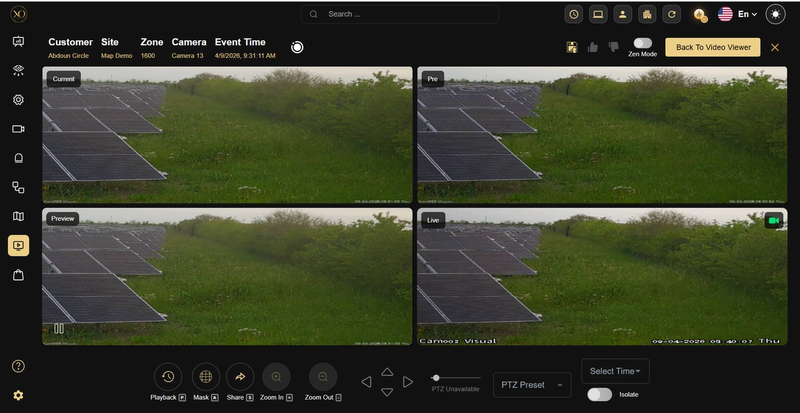
Figure 1: Alarm Quad View Interface — Displays Pre, Current, Preview, and Live frames together, along with AI analysis overlays, enabling operators to quickly understand the full context of an event.
Fullscreen View — Double-click any Quad View tile — including pre-alarm, alarm, post-alarm, and preview — to expand it to full screen for clearer inspection. This allows operators to clearly verify events without struggling with small image sizes. Preview is now fully interactive and supports the same expansion behavior a
Supported Alarm Types
| Alarm Type | Description |
|---|---|
| Motion Detection | Analyzes motion triggers for real vs. false |
| Intrusion Detection | Verifies human or vehicle presence in restricted areas |
| Line Crossing | Confirms object type crossing defined lines |
| Loitering Detection | Identifies person vs. other objects loitering |
| Tamper Detection | Distinguishes real tampering from environmental changes |
Real-World Use Cases
False Alarm Reduction Environmental triggers such as shadows or weather changes are filtered out before reaching operators.
Smart Event Monitoring Instead of generic motion alerts, the system detects meaningful events such as intrusion or line crossing.
Automated Alarm Validation Alarms are automatically classified before being presented to operators, reducing manual review effort.
Operational Efficiency Security teams handle fewer, higher-quality alarms, improving response time and decision-making.
Best Practices
- Use smart events such as intrusion or tripwire instead of basic motion detection.
- Configure devices to provide sufficient context for analysis such as multiple frames.
- Ensure accurate time synchronization across systems.
- Maintain good camera quality and positioning for optimal detection accuracy.
- Avoid excessive environmental noise in camera views where possible.
Additional Details
Integration Workflow
AI Analytics operates as part of the GCXONE ecosystem.
- A device triggers an alarm.
- The event is processed and analyzed using AI.
- The system determines whether the alarm is real or false.
- Valid alarms are passed to operators, while false alarms are suppressed.
Scope and Limitations
What AI Analytics does:
- Analyzes video events using AI before they reach operators
- Filters environmental noise and reduces false alarms
- Applies configurable logic for accurate classification
What AI Analytics does not do:
- Does not replace physical security measures
- Does not guarantee 100% false alarm elimination
- Depends on proper configuration and camera quality