Reconeyez
Introduction
Reconeyez is a wireless, battery-powered intrusion detection system designed for remote and off-grid deployments. It captures event-triggered snapshots and short video clips upon alarm activation. This guide covers how to configure Reconeyez devices and integrate them with the GCXONE platform.
Device Profile
- Type — Wireless PIR Camera / Intrusion Detection System
- Connectivity — LTE/4G (SIM card), Wi-Fi, or Bluetooth
- Events — PIR-triggered image capture and short video clips
- Live Streaming — Not supported (event-based only)
- Playback — Not supported (image-based only)
- Local Mode — Not applicable
Prerequisites
Before starting the integration, ensure the following:
- Reconeyez device is powered on with a valid SIM card (if using LTE) or connected to Wi-Fi
- Device is registered on the Reconeyez Cloud platform
- Firewall and proxy settings allow outgoing connections to the Reconeyez Cloud
- GCXONE administrator access is available
- Device ID from the Reconeyez platform is available (used as Serial Number in GCXONE)
Network Configuration
Reconeyez devices connect over mobile data (LTE/4G), Wi-Fi, or Bluetooth rather than wired Ethernet:
- Insert a SIM card with a valid data plan if using LTE
- If using Wi-Fi, configure network settings through the mobile app or cloud platform — set SSID and password and ensure adequate signal strength
- Devices automatically connect to the Reconeyez Cloud — minimal manual IP configuration is needed
- Ensure firewall and proxy settings allow outgoing connections to the cloud platform
Event Review
Reconeyez is optimized for event-driven capture, not continuous streaming:
- View snapshots or video clips (typically 10–15 seconds) captured upon an event trigger
- Use the cloud portal or mobile app for live status monitoring, reviewing historical events, and downloading clips or images
- Live video is limited due to power conservation on battery-powered devices
- Configure the number of photos and time interval for snapshot capture
Reconeyez Configuration Guide with GCXONE
Step 1 — Log in to GCXONE
Step 2 — Navigate to the Configuration App
Step 3 — Go to Site → Devices → Add and select Reconeyez
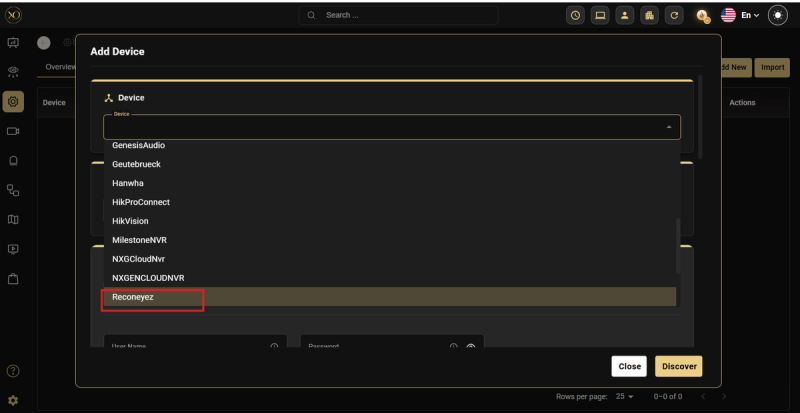
Step 4 — Fill in the required fields:
- Enter the Device ID from the Reconeyez platform as the Serial Number — this field is mandatory
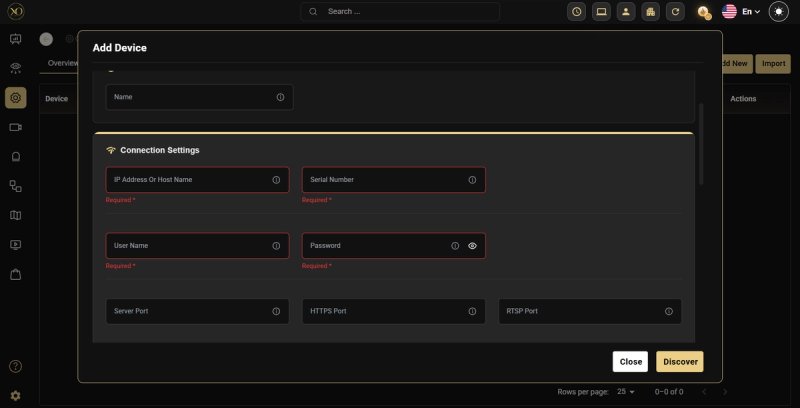
Step 5 — Click Discover
Step 6 — Click Save
Note: The Device ID from the Reconeyez client is used as the Serial Number in GCXONE and is mandatory for successful discovery.
Platform Integration
Reconeyez integrates with GCXONE using the following methods:
- API access for event forwarding and video access
- Email/FTP notifications to external systems
- Central monitoring station integration using protocols such as SIA or Contact ID
- In GCXONE, configure a workflow to add the webhook for event forwarding
Additional Details
- Reconeyez devices are image-based — they do not support continuous live streaming or playback
- Local Mode is not applicable for Reconeyez devices
- Battery-powered design limits live video capability to preserve device battery life
- Ajax PIR-CAMs operate similarly — event-based image capture only
Related Resources
- For device compatibility with playback, refer to Playback Overview
- For Local Mode details, refer to Local Mode Overview
- For contacting support, refer to Contact Support