Arm/Disarm Multilevel Implementation
What Arm/Disarm Multilevel Control Does
Arm/Disarm Multilevel Control enables users to control and monitor device states across Customer, Site, Device Group (Mobile Tower), and Device levels. It delivers bulk operations, real-time state synchronization, improved UI visibility, and backend enhancements — ensuring scalable and reliable device state management.
Why It Matters
Without centralized Arm/Disarm control, managing device states across large deployments requires manual intervention at every level. Multilevel control ensures a single action propagates instantly across all associated devices — with real-time visibility at every level
How It Works
Arm/Disarm capabilities are supported across:
- Customer
- Site
- Device Group / Mobile Tower
- Device
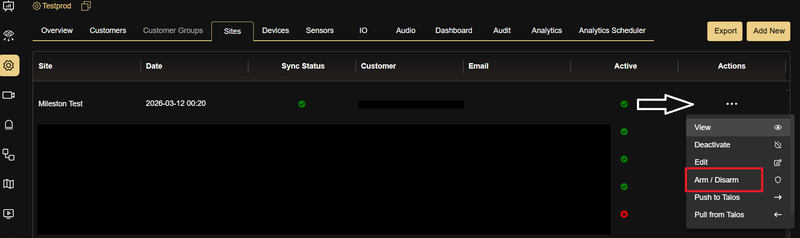
Each level provides:
- Real-time status visibility.
- Direct Arm/Disarm actions.
- Aggregated state representation.
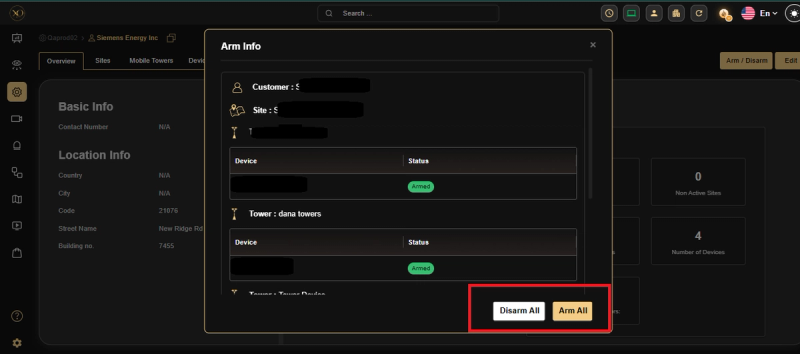
Queued Operation Behavior (Bulk Arm/Disarm)
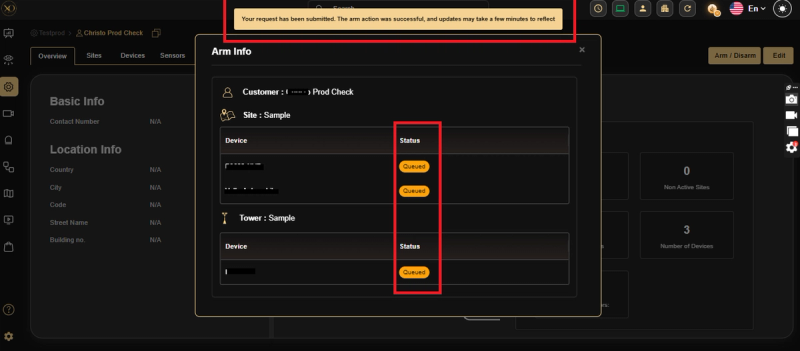
When performing Arm/Disarm operations at Customer, Site, Device Group, and Device levels, the system uses a queued processing mechanism to ensure reliable and consistent execution:
- Once an Arm/Disarm action is triggered, the request is processed asynchronously via a queue.
- During processing: Arm/Disarm buttons are temporarily hidden or disabled at all applicable levels. Users cannot trigger another action until the current operation is completed.
- At the Device level: Status will be shown as "Queued" while the operation is in progress.
- After completion: Arm/Disarm buttons reappear and all levels reflect the updated final state.
Arming Workflow
Stream-based queue processing including:
- Request ingestion.
- Event dispatch (Talos).
- Redis updates.
- MongoDB updates.
- TimescaleDB audit logging.
Key Capabilities
Hierarchical Control
- Arm/Disarm actions available at all hierarchy levels.
- Higher-level actions automatically propagate to associated devices.
- Ensures consistent state alignment.
Bulk Operations
- Bulk Arm/Disarm supported at Customer, Site, and Device Group levels.
- Individual control available at Device level.
- Accessible via list view and overview screens.
State Visibility
Displays consolidated status:
- Armed
- Disarmed
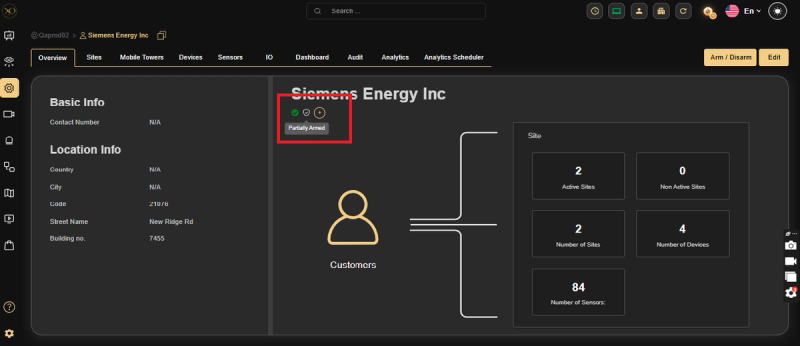
- Partially Armed (mixed states)
Provides both aggregated and per-device visibility.
Real-Time Synchronization
- Immediate updates across UI, backend, and APIs.
- Eliminates delays in state reflection.
UI Enhancements
- Controls integrated into overview pages, action panels, and data tables.
- Consistent and user-friendly interface across all levels.
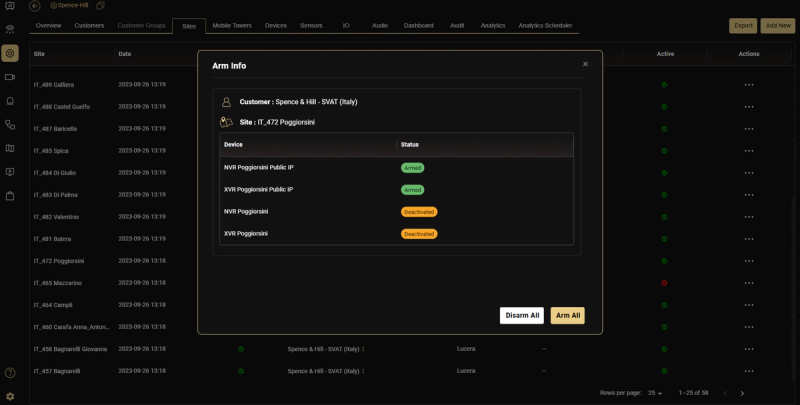
- Arm Info modal — shows Customer and Site context at the top, followed by a per-device status table (Armed / Deactivated).
- Bulk actions — Arm All and Disarm All available directly from the modal.
- Status chips use consistent color coding: green = Armed, yellow = Deactivated, red = Disarmed, blue = Arm Not Supported.
Permission-Based Access
- Role-based access control for Arm/Disarm actions.
- Only authorized users can perform operations.
Detailed Functionality
| Level | Functionality |
|---|---|
| Customer | Centralized control with aggregated visibility across all sites and devices. |
| Site | Manage and monitor all devices within a site. |
| Device Group / Mobile Tower | Group-level control with bulk operations. |
| Device | Individual device control with immediate status updates. |
Arm/Disarm Status Representation
- Customer / Site / Group Levels — Displays Armed, Disarmed, or Partially Armed based on device states.
Real-World Use Cases
- A security manager arms all devices across 50 sites with a single Customer-level action — all devices update instantly without manual intervention.
- A maintenance window is scheduled at a specific site — the admin disarms at the Site level, preventing false alarms during the maintenance period.
- A supervisor monitors a mixed fleet — the Partially Armed status immediately highlights which sites have devices in conflicting states.
Best Practices
- Use higher-level Arm/Disarm actions for bulk operations — avoid manually arming individual devices when a Site or Customer action achieves the same result faster.
- Wait for the queued operation to complete before triggering another — buttons are disabled during processing to prevent conflicting actions.
- Monitor the Partially Armed status regularly — it indicates inconsistent device states that may need investigation.
- Ensure operators have the correct role-based permissions before deploying Arm/Disarm controls to their accounts.
Additional Details
API & Backend Enhancements
GCXONE APIs:
- Update Arm State — Triggers hierarchy-based arm/disarm actions.
- Get Arm State — Returns device-level states and aggregated status.
Genesis APIs:
api/v1/device/patchDeviceArmState— Updates device arm state with timestamp (armStateUpdatedTime).api/v1/device/getDeviceIdsByHeirachyId— Enhanced to filter unsupported or inactive devices.
Analytics Update
- Added new entry in MongoDB Analytics collection:
productName = "Device Arming". - Includes supportedDevices configuration for arming support.
User Impact
- Enables efficient bulk and hierarchical device control.
- Improves visibility and monitoring of device states.
- Ensures faster, reliable, and consistent system performance.
- Enforces secure access through role-based permissions.