Zombie Alarm Handling (No Image Alarms)
What Zombie Alarm Handling Does
During alarm processing, if an alarm takes more than 120 seconds to be processed, it is classified as a zombie alarm. Zombie Alarm Handling ensures operators receive clear feedback when alarm images fail to load due to extended processing times, instead of leaving them with a blank or unresponsive screen.
Why It Matters
Without clear feedback, operators waste time waiting for images that will never load — slowing incident response and creating confusion. Zombie Alarm Handling eliminates that ambiguity by immediately surfacing a clear message and directing operators to take the right action.
How It Works
When an alarm exceeds the 120-second processing threshold:
- Alarm images for such events will not be available.
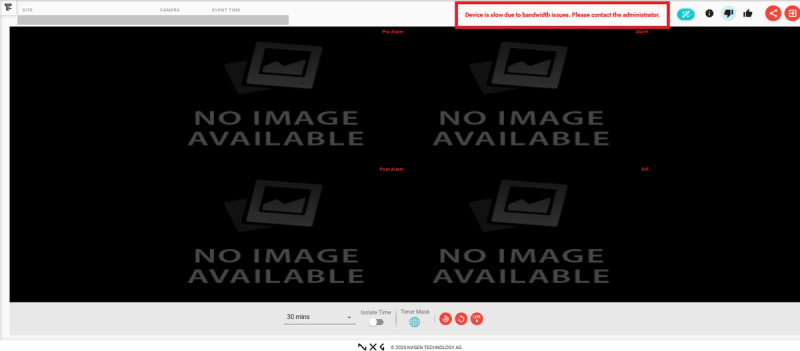
- Upon opening a zombie alarm, the quad will display the message: "No image available".
- An error message will also be shown: "Device is slow due to bandwidth. Please contact your administrator."
Key Capabilities
Zombie Alarm Classification
| Property | Value |
|---|---|
| Classification Threshold | 120 seconds |
| Maximum Event Processing Duration | 120 seconds (default, not configurable) |
| Quad Display Message | "No image available" |
| Error Message | "Device is slow due to bandwidth. Please contact your administrator." |
New Information Icon in Salvo Quad
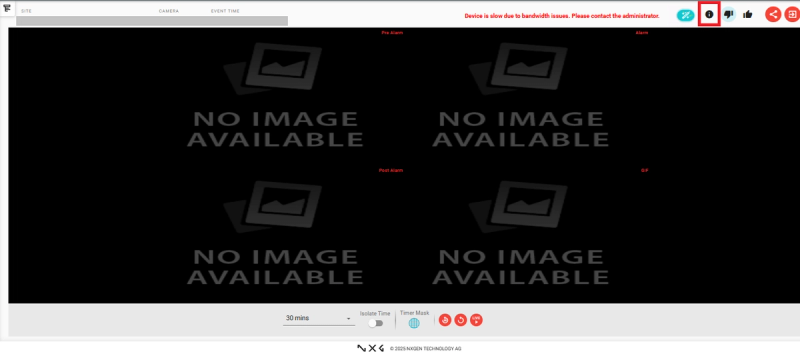
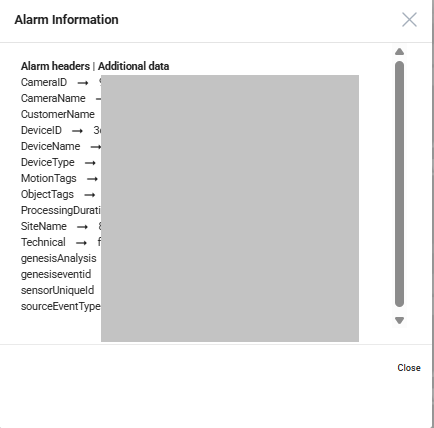
A new information icon is displayed in the Salvo quad. Upon clicking this icon, users can view detailed information about the corresponding alarm — providing easier access to alarm details directly from the Salvo view during alarm monitoring.
Real-World Use Cases
- An alarm triggers on a site with poor bandwidth — the operator immediately sees "No image available" and contacts the administrator instead of waiting indefinitely for footage to load.
- An operator reviewing alarms in Salvo Quad clicks the information icon to view full alarm details without leaving the current view.
Best Practices
- If zombie alarms appear frequently on a specific device, escalate to the administrator immediately — repeated zombie alarms indicate a persistent bandwidth or connectivity issue.
- Use the information icon in Salvo Quad to review alarm details before escalating — it provides context without requiring screen switching.
- Contact your administrator when the "Device is slow due to bandwidth" message appears — the Maximum Event Processing Duration threshold is not configurable and requires infrastructure-level resolution.