Alarm Panels Integration Guide
Alarm Panels (also known as intrusion panels) are the central hubs of security systems that monitor sensors like door contacts, motion detectors, and glass-break sensors. By integrating these panels with GCXONE, you transform standard security alerts into AI-verified events, reducing false positives by approximately 80% to 95% and ensuring a streamlined response through a single cloud interface.
GCXONE supports a wide range of panels, including modern cloud-based systems like AJAX and specialized wireless systems like Reconeyez, as well as legacy panels using the DC09 (SIA) protocol.
Alarm Panels
Intrusion Detection Systems
Overview
Alarm panels serve as the nervous system of a building's security infrastructure. The sensors are the fingertips that feel a touch (motion), and the panel is the spinal cord that sends the signal. GCXONE acts as the brain; it looks at the signal, opens its "eyes" (cameras), and decides if the touch was a friendly tap or a dangerous strike before telling the "muscles" (operators) to react.
Key Benefits
- AI-Powered Verification: Automatically classify alarms as real threats or false positives
- 80-95% False Alarm Reduction: Significantly reduce operator workload and improve response efficiency
- Unified Interface: Manage all alarm panels through a single cloud dashboard
- Multi-Protocol Support: Compatible with SIA DC-09, cloud-based systems, and proprietary protocols
- Visual Context: Combine alarm data with camera images for comprehensive threat assessment
System Architecture
The integration usually follows a dual-path communication flow. The raw alarm data is sent to the monitoring station via the DC09/SIA interface, while visual data (if the panel has camera capabilities) is pushed to GCXONE for AI analysis.
Note: GCXONE acts as the intelligence layer, analyzing images and returning "Real" or "False" classifications to the operator.
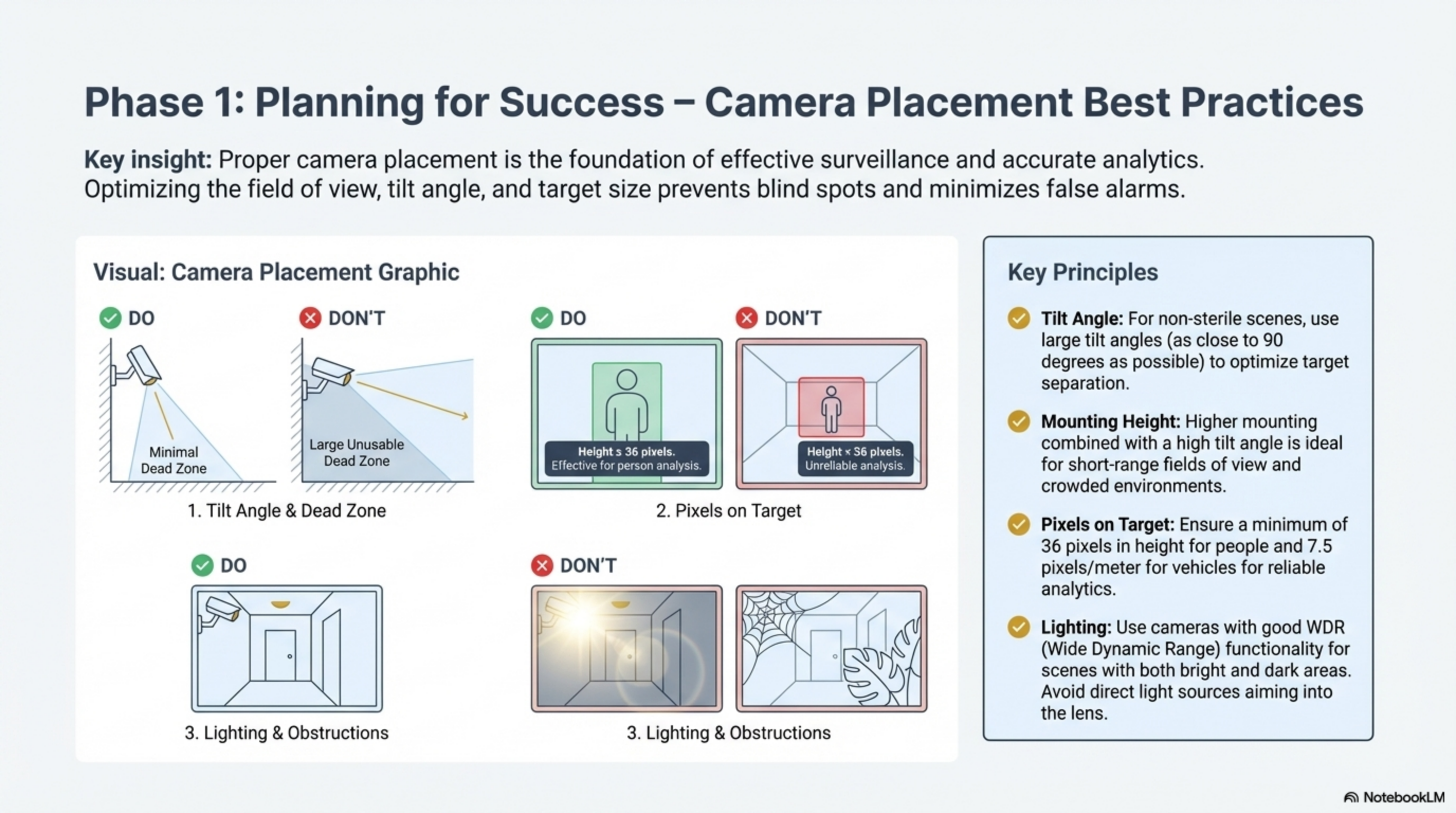
Figure 1: Alarm panel integration architecture showing dual-path communication flow.
Prerequisites for Integration
Before beginning the onboarding process, ensure you have the following critical information from your service provider:
- Receiver IP Address: The endpoint where the panel will send signals
- Listening Port: Usually port 10000 for DC09 or specific vendor ports
- Account ID: A unique 8-digit identifier for each site
- Encryption Key: If the panel supports encrypted transmission (highly recommended)
- Administrative Access: Access to the panel's native mobile app or desktop software
Integration Guide: AJAX Systems
AJAX integration involves an approval process and a cloud-to-cloud connection.
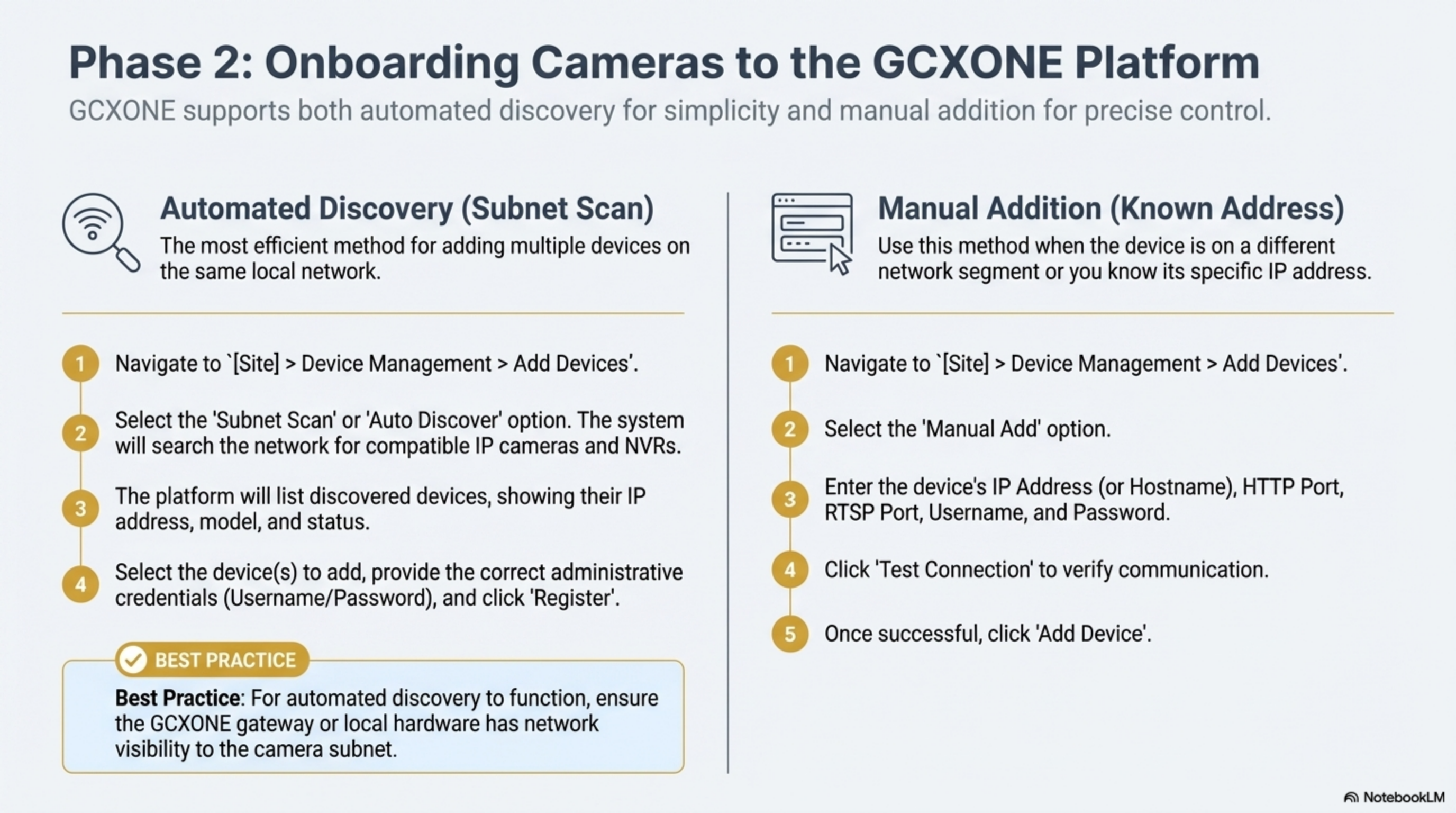
Figure 2: AJAX Systems integration configuration interface.
1. Granting Access to GCXONE
- Login to the AJAX Pro Desktop application
- Navigate to your company settings and send an invitation to the GCXONE authorized account (
ajax@nxtn.io) - Notify the GCXONE support team to approve the request for your specific Hub ID
2. Configuring the Hub
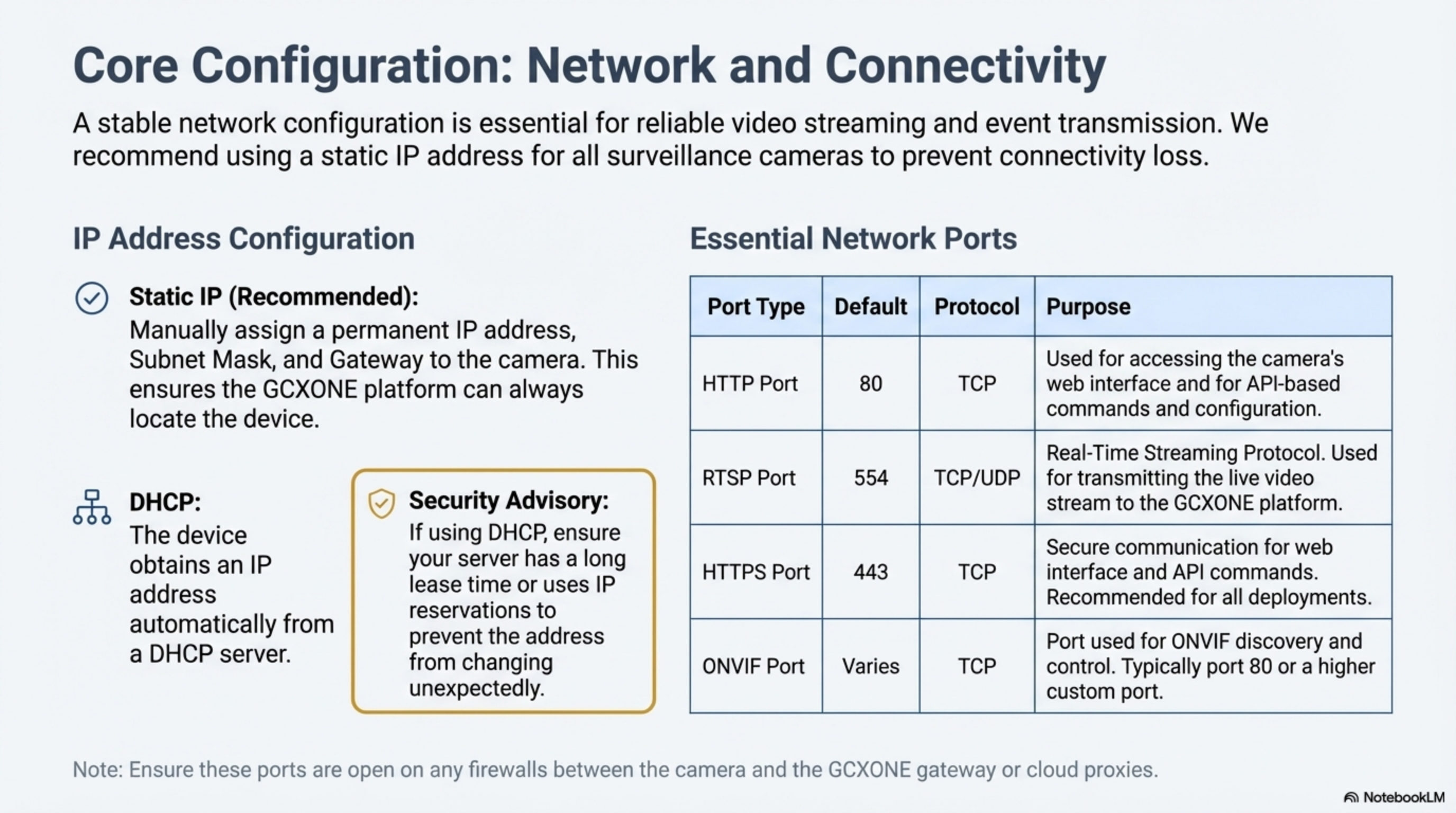
Figure 3: AJAX Hub monitoring station configuration.
- In the AJAX application, go to Hub Settings > Monitoring Station
- Select SIA (DC-09) as the protocol
- Enter the Primary IP Address and Port provided by the GCXONE team
- Enable "Connect on demand" and "Transfer group name" to ensure individual sensors are identified correctly in the GCXONE dashboard
Integration Guide: Reconeyez PIR Cams
Reconeyez panels are battery-operated systems that prioritize power conservation and event-driven capture.
1. Enable Image Transmission
- Configure the panel within the Reconeyez portal
- Contact Reconeyez support to request an image push to the GCXONE FTP server
2. Configure SIA Alarms
- Add the Reconeyez device in the GCXONE Configuration App using the device's Serial Number
- Set the SIA DC-09 receiver details in the Reconeyez portal to point to the GCXONE Alarm Receiver Gateway
AI Verification Workflow
When an alarm is triggered (e.g., an AJAX PIR Cam takes 3-5 quick photos), the following occurs:
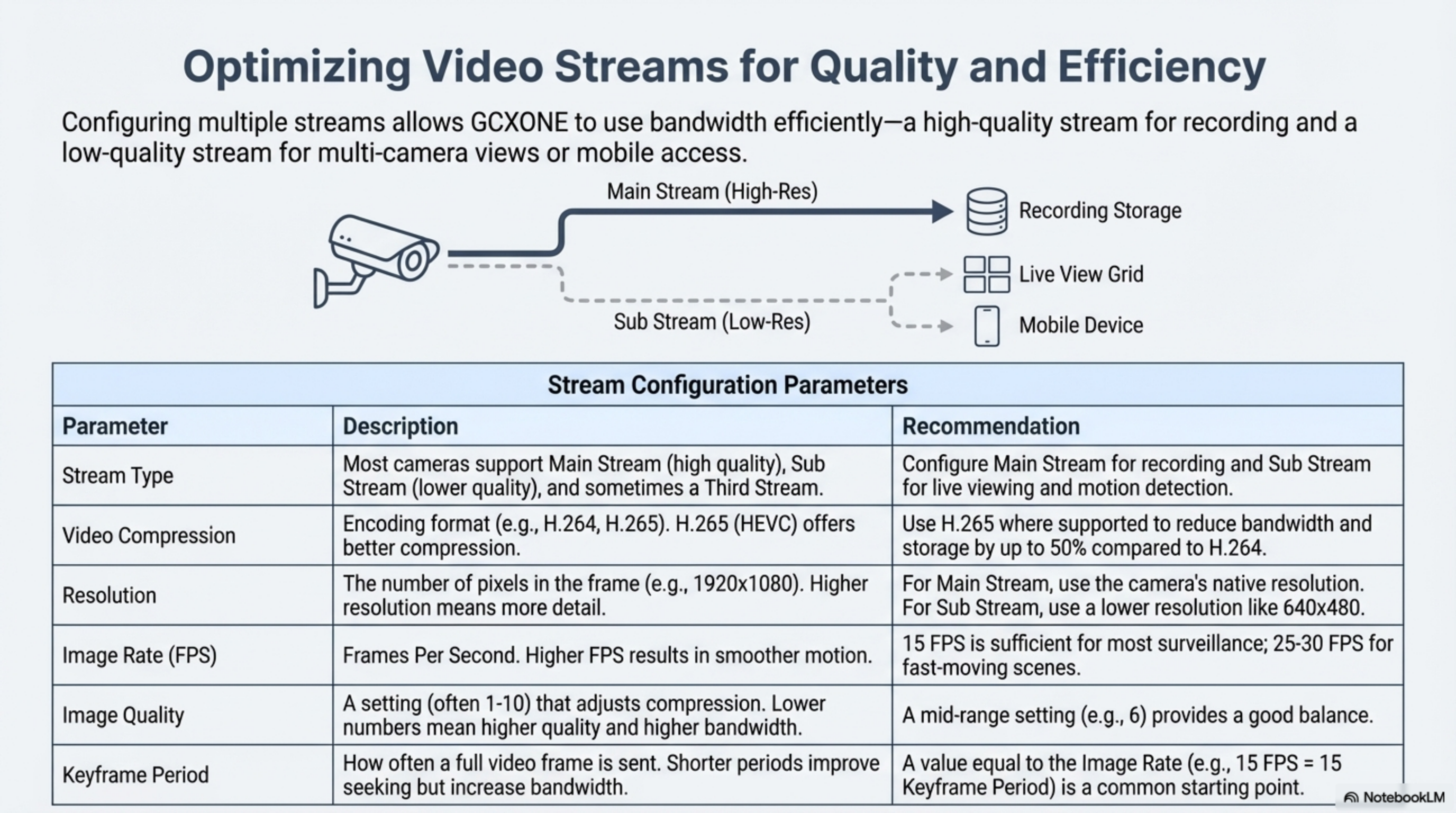
Figure 4: AI-powered alarm verification workflow showing the analysis process.
- Reception: The raw event lands in the Talos CMS
- AI Analysis: A workflow automatically sends the associated images to the GCXONE AI Engine
- Classification: The AI scans for human or vehicle activity. If it identifies a person, it marks a bounding box on the image
- Reporting: If classified as "False" (e.g., caused by a tree leaf or animal), the alarm can be automatically closed without distracting the operator
AI Verification Results
Figure 5: AI verification results showing bounding boxes and classification status.
The AI engine provides detailed analysis including:
- Object Detection: Identifies humans, vehicles, or other objects
- Bounding Box Visualization: Highlights detected objects in the image
- Confidence Scores: Provides probability ratings for classifications
- False Alarm Filtering: Automatically filters out non-threatening events
Optimization and Troubleshooting
| Issue | Possible Cause | Resolution |
|---|---|---|
| No Alarms in GCXONE | Missing "Notify Surveillance Center" | Ensure this checkbox is enabled for every rule on the panel |
| Images Not Matching Alarms | Incorrect Alarm ID mapping | Verify the Alarm Shot ID is being passed correctly in the webhook payload |
| All Alarms on One Camera | "Transfer Group Name" disabled | Enable this setting in the AJAX Hub to see individual sensor channels |
| Duplicate Alerts | Redundancy Timer too low | Adjust the Redundancy Timer (default 30s) in GCXONE custom settings |
Best Practices
- Photo Settings: For battery-operated panels like Reconeyez, configure the device to take three photos with a 500ms interval at medium quality to optimize both battery life and AI accuracy
- Site-to-Site VPN: For maximum security, use a VPN tunnel (OpenVPN or IPsec) to connect the panel network to the GCXONE cloud, eliminating the need for public IP exposure
- Continuous Monitoring: Ensure panels are configured for continuous monitoring during armed periods
- Sensor Testing: Regularly test all sensors to verify proper communication with the panel
Supported Panel Types
GCXONE supports various alarm panel types:
Cloud-Based Systems
- AJAX Systems - Modern wireless security systems with cloud connectivity
- Reconeyez - Battery-powered PIR cameras with alarm capabilities
Legacy Systems
- SIA DC-09 Protocol - Standard protocol for traditional alarm panels
- Proprietary Protocols - Various manufacturer-specific protocols
Configuration Checklist
Before deploying an alarm panel integration, ensure:
- Panel firmware is up to date
- All sensors are properly enrolled and tested
- Monitoring station credentials are configured
- Network connectivity is verified
- Firewall rules allow communication to GCXONE gateways
- Image transmission is enabled (if supported)
- Alarm forwarding rules are configured
- Test alarms are sent and received successfully
Related Articles
- IP Cameras Integration Guide
- IoT Sensors Integration Guide
- Alarm Management Overview
- AI-Powered Alarm Verification
- Troubleshooting Alarm Issues
Need Help?
If you're experiencing issues with alarm panel integration, check our Troubleshooting Guide or contact support.